
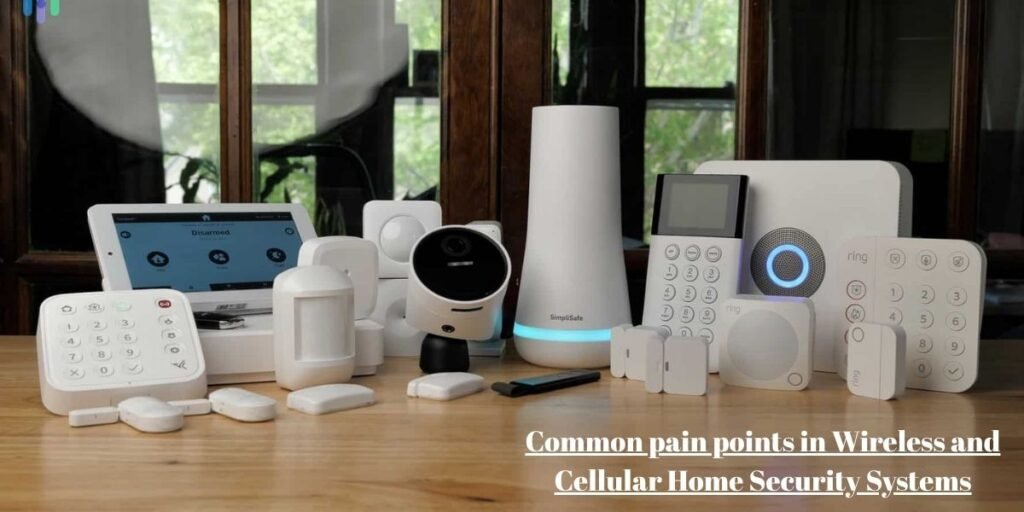
Homeowners choose wireless security systems for practical reasons that simplify property protection. Installation requires fewer tools, sensors attach securely without drilling through drywall to run cables, and modern systems integrate seamlessly with smartphone alerts, remote arming controls, and professional monitoring services.
However, security reliability depends on more than whether individual sensors can communicate with the main control panel. A system might successfully detect an open door but fail to transmit the alarm signal to its monitoring center. A security camera might continue recording locally onto an SD card while completely losing remote live-feed access. A cellular-connected alarm panel might remain operational during a utility failure while other smart-home devices lose power entirely.
Understanding these vulnerabilities requires separating wireless sensors from cellular monitoring. These technologies work together within a modern security ecosystem, but they represent entirely separate communication layers that can fail independently.
How Wireless and Cellular Home Security Systems Work
Evaluating potential problems requires a clear grasp of how hardware components interact from the moment an event occurs to the delivery of an emergency alert.
Wireless Sensors and the Main Control Panel
Door and window contacts, motion detectors, glass-break sensors, and environmental monitors do not operate in isolation. These battery-powered peripherals communicate wirelessly with a central hub or alarm panel using dedicated radio-frequency protocols rather than connecting directly to the household Wi-Fi router.
This architectural separation is vital. If a home experiences a broadband internet outage, the radio link between a door sensor and the control panel remains fully active because it relies on localized radio frequencies rather than internet data packets.
Wi-Fi, Cellular Monitoring, and Dual-Path Connections
Security systems typically rely on one of three distinct communication arrangements to reach the outside world:
- Broadband communication: The system uses the home internet router to transmit alarm events and video feeds through cloud servers.
- Cellular communication: A compatible alarm panel contains a built-in cellular module, allowing it to transmit signals over mobile networks without depending on local internet service.
- Dual-path communication: The system utilizes both broadband and cellular connectivity simultaneously, automatically failing over to the cellular network if the primary internet connection drops.
It is important to recognize that cellular monitoring on an alarm panel does not automatically make every connected smart camera or peripheral device independent of home Wi-Fi. Cameras typically demand high bandwidth and rely heavily on local broadband connections.
What Happens Between Detection and an Alert
Every security event follows a strict chronological sequence that creates multiple points of potential failure:
- A physical sensor detects an abnormal event such as a breached entry point or motion.
- The sensor transmits a radio frequency signal to the central alarm panel.
- The panel processes the incoming data signal and evaluates system arming states.
- The system transmits the alarm notification through its active communication path.
- The homeowner or the professional monitoring center receives the alert.
Recognizing this sequence helps isolate where a system breakdown occurs when equipment fails to perform as expected.
What Makes Wireless and Cellular Home Security Systems Worth Using?
Before exploring common operational flaws, it is important to understand why millions of property owners choose wireless security over traditional hardwired installations.
Easier Installation and Fewer Physical Cables
Running physical wiring through finished walls, concrete foundations, and multi-story structures involves invasive construction work, professional labor costs, and significant cosmetic repair. Wireless systems eliminate these barriers by utilizing adhesive mountings and battery-powered peripherals.
This flexibility makes wireless technology ideal for rental properties, historical homes, and modular living spaces where drilling holes is impractical. Homeowners can easily relocate sensors or expand coverage when remodeling a room without rewiring an entire zone.
Smartphone Alerts and Remote System Control
Modern security architecture puts system management directly into the user’s pocket via dedicated mobile applications. Property owners can arm or disarm their security configuration remotely, verify sensor statuses in real time, receive instant push notifications when a door opens, and view live video feeds from compatible cameras while away from the property.
These capabilities transform a static home alarm into an active interactive management tool, though they depend heavily on active device compatibility and stable software services.
Cellular Backup During Internet Outages
Traditional landline alarms and pure internet-dependent systems share a major vulnerability: if the physical connection is severed, monitoring ceases. Cellular backup introduces a vital redundancy layer.
If a compatible alarm panel loses its primary broadband connection due to a severed fiber line or router failure, the built-in cellular module maintains a direct wireless link to the monitoring center. This ensures that alarm reporting can continue even when the home network goes dark.
Easier Expansion and Smart-Home Integration
As household security needs evolve, wireless platforms allow users to add new equipment incrementally. Property owners can integrate environmental monitors, glass-break detectors, automated smart locks, and indoor cameras into the existing panel ecosystem.
However, system expansion requires careful attention to hardware compatibility, as most control panels only accept proprietary sensors or specific certified third-party communication protocols.
Common Problems With Wireless and Cellular Home Security Systems
Even the most advanced security setups encounter real-world operational obstacles that can impact reliability if left unaddressed.
1. Wi-Fi and Internet Outages Can Interrupt Alerts
When a home internet connection fails, systems that rely entirely on broadband lose their primary reporting pathway and cloud-connected remote access. While local sensors may still trigger an on-site siren, smartphone notifications and remote app controls often become completely unavailable.
Homeowners should verify whether their control panel features built-in cellular backup, confirm that cellular monitoring is included in their active service agreement, and evaluate whether a backup power supply for the home router is necessary to maintain full smart-home connectivity during local utility disruptions.
2. Weak Cellular Reception Can Prevent Reliable Alarm Reporting
A cellular-connected panel is only as reliable as the mobile signal it receives at its specific indoor mounting location. Thick concrete foundations, exterior metal siding, radiant barrier insulation, and distance from nearby cell towers can severely degrade cellular signal strength.
A panel installed deep inside an interior utility room or basement may fail to transmit emergency signals during a crisis. Property owners must check diagnostic signal indicators, confirm which mobile networks the equipment utilizes, and consult their provider if reception proves inadequate.
3. Power Outages Can Disable More Than One Part of the System
A widespread electrical grid failure affects multiple system components differently, creating unexpected vulnerabilities. While an alarm panel may possess an internal backup battery, the home Wi-Fi router, cable modem, and IP cameras often lack independent power sources.
If the router loses power, internet-dependent cameras and app features go offline immediately. Furthermore, if an outage outlasts the control panel’s backup battery runtime, the entire security hub will eventually shut down, halting all on-site detection and reporting capabilities.
4. Wireless Sensors Can Lose Their Connection to the Panel
Wireless sensors rely on stable radio frequencies to communicate with the main control hub. Physical obstacles such as thick stone walls, large metal appliances, reinforced concrete, and extreme distance can disrupt these signals.
When a peripheral device loses its connection, the control panel typically registers a supervision fault or offline warning. The affected zone loses active monitoring, leaving that specific entry point or room unprotected until the connection is restored.
Homeowners should review sensor warning logs regularly, verify that devices remain within the manufacturer’s permitted range, and ask their provider about approved signal repeaters if architectural interference blocks communication.
5. Batteries Require Ongoing Attention
Unlike hardwired security systems that draw continuous low-voltage power from the home electrical grid, wireless devices depend entirely on individual batteries. Sensors, keypads, and control panels require periodic power maintenance to remain operational.
Assuming a wireless system will function indefinitely without human intervention introduces serious risk. Different components utilize distinct battery types and replacement schedules.
Homeowners must respond promptly to low-voltage notifications, follow the manufacturer’s exact replacement guidelines, and test devices immediately after installing new batteries to ensure proper system synchronization.
6. Cellular Backup and Professional Monitoring Can Add to the Cost
Purchasing security hardware represents only the initial financial commitment. Long-term ownership often involves ongoing operational costs that can catch buyers off guard.
Depending on the provider, monthly expenses may cover professional monitoring services, cellular network connectivity fees, cloud video storage tiers, and advanced mobile application features. A low upfront hardware cost does not reflect the total lifetime expense of operating the system.
Property owners should review contract lengths, clarify whether cellular fees are bundled into monitoring packages, and understand what operational features remain available if a subscription lapses.
7. False Alarms and Unnecessary Notifications Can Become a Habit
Unwanted alerts triggered by incorrect sensor placement, pets moving through unauthorized zones, environmental shifts, or user error create significant friction. When a system generates frequent false alarms, homeowners often begin ignoring notifications or silencing the panel hastily.
This habit creates a dangerous window of vulnerability during an actual emergency.
To minimize false triggers, users should adjust motion sensor sensitivity according to manufacturer guidance, verify pet-immunity weight limits, review entry delay timers, and check local municipal false-alarm policies, as some jurisdictions impose financial penalties for repeated unnecessary emergency dispatches.
8. Cameras May Lose Remote Viewing Even When the Alarm Still Works
Homeowners frequently treat a home security setup as a single unified appliance, assuming that if the alarm panel functions, every connected camera is equally operational. In reality, security cameras often rely on entirely different infrastructure layers than basic door and window sensors.
A high-definition security camera typically demands heavy bandwidth, requiring a stable home Wi-Fi connection and an active internet link to stream live video or upload footage to cloud storage.
If a broadband connection drops, a cellular-enabled alarm panel may still successfully transmit a break-in alert using its mobile backup chip while nearby Wi-Fi cameras fail to stream live video or record cloud footage.
Property owners should check whether their cameras support local SD-card recording, verify how video storage handles network interruptions, and evaluate camera power and connectivity independently from the main control panel.
9. Signal Interference and Jamming Can Affect Wireless Communication
Because wireless sensors and cellular modules rely on radio frequencies to transmit data, they are inherently exposed to radio interference. Accidental interference can stem from competing household electronics, neighboring Wi-Fi networks, or heavy industrial machinery operating nearby.
Deliberate signal jamming involves malicious actors utilizing unauthorized transmitters to flood a specific frequency band, blocking wireless sensors from communicating with the control panel.
Modern high-tier security systems mitigate these risks through supervised sensor connections, encrypted radio protocols, and built-in interference detection that alerts the panel if radio noise blocks normal operations.
Homeowners should select equipment equipped with robust communication protections, enable system-health notifications, and investigate unexpected supervision faults immediately.
10. App Failures and Subscription Changes Can Reduce Convenience
Smartphone applications serve as the primary window into modern security ecosystems, but they introduce a distinct layer of vulnerability. Server outages at the monitoring provider, outdated mobile operating systems, expired credentials, or dropped internet access can prevent users from logging into their security app.
It is essential to separate temporary mobile app glitches from actual failures in the local alarm hardware. A temporary software login error does not mean the physical sensors or loud sirens have stopped protecting the premises, but it does eliminate remote visibility and mobile control.
Property owners should keep their mobile applications and panel firmware updated, maintain secure multi-factor authentication, and keep a traditional physical keypad or key fob available as a backup method for arming and disarming the system.
What Happens When One Part of the System Fails?
A modern security installation operates as a collection of interconnected technology layers rather than a single standalone device. Understanding how a failure in one component impacts the rest of the ecosystem helps prevent dangerous assumptions during an emergency.
| Component Failure | What May Still Function | What May Be Affected |
| Home internet outage | Local wireless sensors, main alarm panel, on-site siren | Remote smartphone app access, cloud features, internet-based alarm reporting |
| Cellular network unavailable | Local sensor detection, on-site siren, broadband reporting | Cellular backup alarm reporting to monitoring center |
| Main power outage | Battery-backed control panel, wireless sensors | Wi-Fi router, IP security cameras, unpowered network equipment |
| Sensor loses contact with panel | All other connected sensors, central panel functions | Active perimeter detection in the affected coverage zone |
| Camera loses Wi-Fi connection | Alarm sensors, cellular reporting paths if independent | Live video streaming, remote camera access, cloud recording features |
| Backup battery depleted | Devices featuring independent internal power sources | All security functions dependent on the unpowered hardware unit |
| Monitoring subscription expires | Basic local alarm sounds, depending on manufacturer design | Professional dispatch services, cellular backup reporting, mobile app features |
A security system can continue detecting an intrusion locally while remaining completely unable to transmit an emergency signal externally. Recognizing this distinction is one of the most critical safeguards for property owners relying on wireless technology.
How to Prevent the Most Common Wireless Security Problems
Maintaining a reliable home security setup requires proactive system management rather than passive reliance. Implementing a structured maintenance routine prevents minor equipment glitches from escalating into severe security blind spots.
Test the System Before Relying on It
Property owners should routinely execute manual test cycles following the manufacturer’s exact procedures. Testing involves triggering individual door contacts, walking past motion detectors, and sounding the physical siren to verify local audio output.
For professionally monitored setups, homeowners must coordinate testing windows directly with their monitoring center to prevent accidental emergency service dispatches.
Verify Both Communication Paths
Having hardware capable of both Wi-Fi and cellular connections does not guarantee that both pathways are actively functional. Homeowners should inspect system-health diagnostic menus on the control panel and consult their provider to verify that cellular backup activates correctly during a simulated broadband drop.
Regular communication verification ensures that redundancy safeguards operate seamlessly when an actual outage occurs.
Check the Backup Batteries and Power Arrangement
Because security hardware relies on multiple independent power sources, maintenance cannot stop at the main control panel. Homeowners must inspect sensor coin-cell batteries, monitor backup battery health inside the alarm hub, and ensure that network routers and modems feature adequate uninterruptible power supply protection.
Maintaining one power source does not protect unpowered peripheral equipment.
Review Coverage Before Adding More Devices
Expanding a security ecosystem requires evaluating signal strength and physical distance. When adding new cameras or environmental sensors in detached garages, remote basements, or extended wings, installers must verify that devices remain within the control panel’s permitted radio frequency range.
Using approved signal repeaters prevents unexpected communication dropouts across large residential properties.
Keep Monitoring and Account Details Current
A technically sound security system can still fail if administrative details lapse. Homeowners must keep subscription payments current, update emergency contact lists, refresh verbal passcodes, and adjust notification permissions immediately when household routines change.
Ensuring that monitoring centers reach the correct contacts during an alert is just as vital as maintaining physical hardware.
When a Wireless or Cellular Security System Needs Professional Attention
While routine maintenance handles basic upkeep, certain operational issues require expert intervention rather than independent troubleshooting.
- Persistent communication faults: The control panel repeatedly logs reporting errors even after verifying internet and cellular connections according to manufacturer guidelines.
- Inadequate cellular reception: Signal strength remains critically low at the desired installation location despite attempting recommended placement adjustments.
- Degraded backup batteries: Internal panel batteries fail to hold an adequate charge during power testing or display permanent low-voltage warnings.
- Repeated sensor drops: Multiple peripheral devices repeatedly lose their radio connection to the central hub despite being within normal operating ranges.
- Failed alarm test cycles: The system fails to transmit test signals successfully during a coordinated check with the monitoring center.
- Persistent hardware errors: Cameras, control panels, or specialized sensors show unresolvable physical error codes or internal component malfunctions.
- Account visibility confusion: The homeowner cannot definitively confirm whether cellular backup reporting or professional monitoring services are actively provisioned.
Property owners should rely on qualified technicians or provider support teams for advanced diagnostics, hardware replacements, and on-site service calls. Attempting to modify internal circuit boards, bypass tamper switches, or service high-voltage power inputs independently creates severe safety risks.
Is a Wireless and Cellular Home Security System the Right Choice?
Selecting the ideal home security architecture depends heavily on individual property layouts, available local infrastructure, budget constraints, and personal tolerance for ongoing maintenance.
When Wireless Systems Make Sense
Wireless setups provide unmatched flexibility for rental properties, historical homes with strict architectural preservation rules, and households that require clean installations without invasive wall drilling.
They allow rapid deployment, easy relocation of sensors, and seamless smart-home integration for modern residential needs.
When Cellular Backup Is Particularly Valuable
Cellular backup is essential for properties located in regions prone to severe weather, high wildfire risks, or frequent utility grid interruptions. Homes where maintaining continuous alarm reporting during broadband cable cuts is a priority benefit heavily from dual-path communication, provided local cellular reception is strong and stable.
When a Wired or Hybrid System Deserves Consideration
Hardwired security systems avoid radio interference and battery degradation issues on fixed sensors, making them highly reliable in commercial buildings or properties under construction.
Many modern installations utilize a hybrid design, combining reliable hardwired perimeter sensors with flexible wireless expansion devices and cellular reporting modules to capture the best of both engineering approaches.
Frequently Asked Questions
Does the alarm panel communicate through Wi-Fi, cellular service, or both?
Security panels utilize different communication methods depending on the hardware model and selected service tier. Some budget systems rely exclusively on local Wi-Fi, while advanced panels support dual-path configurations that combine broadband internet with cellular module backups.
Does activating cellular backup require a separate monthly subscription?
Yes, in most cases. While the physical cellular chip is built into compatible alarm hardware, mobile network carriers charge for data connectivity. Providers typically bundle this fee into professional monitoring packages or intermediate interactive service plans.
What specific security features continue operating when the home internet connection goes down?
When broadband fails, local capabilities like perimeter door sensors, window contacts, motion detectors, and on-site sirens continue functioning normally. However, remote app controls, cloud video storage, and internet-based notification alerts will go offline unless the panel features an active cellular backup path.
What equipment remains powered during a grid electricity failure, and how long does the backup last?
The main control panel relies on an internal backup battery designed to keep core detection functions running temporarily during a power outage. Unpowered network routers, modems, and standard plug-in IP cameras will shut down immediately unless connected to an independent uninterruptible power supply. Backup runtimes vary based on battery age and system load.
Do security cameras feature independent power sources and local SD-card recording capabilities?
Hardware capabilities vary significantly by manufacturer. Some security cameras plug directly into standard wall outlets and rely entirely on cloud servers, while others offer battery power and local SD-card storage options to preserve footage during network disruptions.
How does the control panel alert the user when an individual wireless sensor loses communication?
Supervised wireless sensors send periodic heartbeat signals to the central panel. If a device stops responding due to interference, battery depletion, or physical damage, the panel logs a supervision fault and displays an on-screen warning or audible chime.
Which smart-home integrations and third-party devices are officially compatible with the system?
Compatibility is strictly governed by the control panel’s operating system and supported radio protocols like Z-Wave, Zigbee, or proprietary frequencies. Homeowners must verify device lists directly with the security manufacturer before integrating smart locks, thermostats, or lighting controls.
What happens to professional monitoring and remote app features if a subscription expires?
When a monitoring contract lapses or payment fails, professional dispatch services and cellular backup reporting are typically disabled immediately. Depending on the equipment model, basic local alarm sounds may continue to function locally on the property.
What specific testing routines and maintenance schedules does the manufacturer recommend?
Manufacturers generally advise performing monthly manual walk tests, checking system-health status screens weekly, replacing wireless sensor batteries every one to three years, and testing backup power components annually.
What are the contract length terms, cancellation policies, and equipment ownership rules?
Security provider agreements range from month-to-month self-monitoring plans to multi-year professional monitoring contracts. Terms regarding early termination fees, equipment financing payoffs, and hardware ownership vary widely across different security providers.