

Securing sensitive business data within a shared cloud data platform presents a continuous operational challenge for enterprise architecture teams. Organizations frequently store personally identifiable information, financial metrics, medical records, and proprietary operational logs inside centralized data warehouses. Multiple departments, ranging from external analytics partners to internal compliance officers, require query access to the same underlying tables, yet each group operates under drastically different data privacy entitlements.
Relying on traditional data segregation methods like duplicating tables, maintaining fragmented data marts, or building complex database views creates severe administrative overhead and increases storage costs. Snowflake Dynamic Data Masking addresses this governance requirement directly within Snowflake column-level security framework.
By applying policy-driven controls at query execution time, organizations ensure that unauthorized users receive obfuscated values while authorized roles inspect raw data. This implementation guide details the configuration steps, security architecture, and practical SQL patterns required to deploy dynamic masking policies across production Snowflake environments.
What Is Dynamic Data Masking in Snowflake?
Dynamic Data Masking is a column-level security feature in Snowflake that dynamically obfuscates sensitive column data at query runtime based on predefined policy logic. Rather than modifying the physical data stored on disk, Snowflake evaluates the executing user active role and applies conditional masking logic before returning query results.
The core objective of dynamic masking is to enforce the principle of least privilege without altering underlying data pipelines or requiring duplicated schema objects. Depending on how a masking policy is structured, a query can return the original raw value, a fully redacted string, a partially masked pattern, or a cryptographically hashed representation.
Key enterprise use cases for Dynamic Data Masking include protecting specific sensitive attributes across tables:
- Customer Identifiers: Social Security numbers, national identity codes, and passport details.
- Contact Information: Personal email addresses, home street addresses, and primary phone numbers.
- Financial Details: Credit card primary account numbers, bank account routing details, and personal salary figures.
- Corporate Secrets: Unannounced product identifiers, internal API keys, and sensitive operational logs.
Dynamic Data Masking operates directly within Snowflake role-based access control (RBAC) model and data governance framework. The original underlying data remains fully intact in micro-partitions. This feature requires Snowflake Enterprise Edition or higher.
How Snowflake Dynamic Data Masking Works
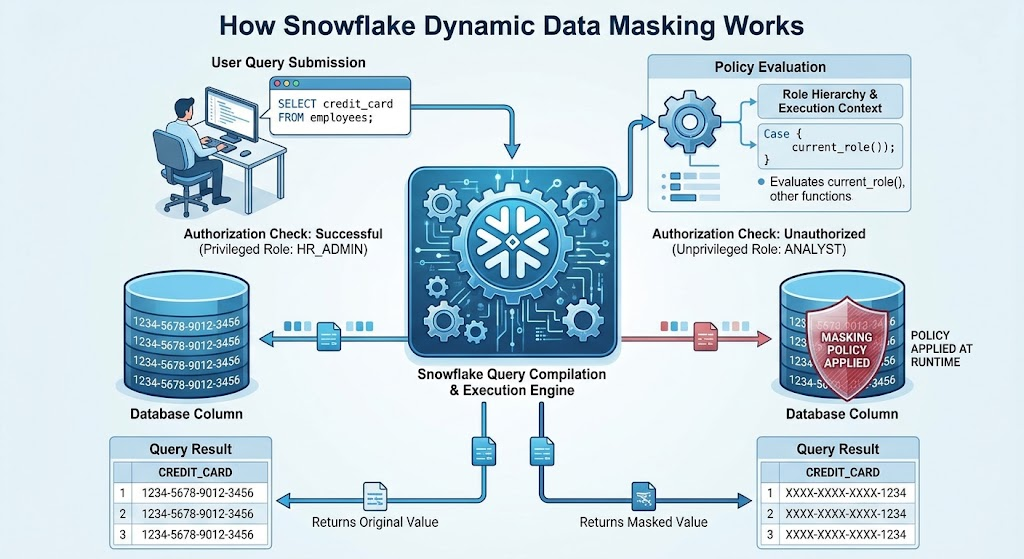
The execution flow of Dynamic Data Masking occurs entirely at query runtime within Snowflake query compilation and execution engine. When a user submits a SQL statement referencing a table or view column protected by a masking policy, Snowflake intercepts the request and evaluates the policy condition prior to returning rows.
Use any one image!!!!
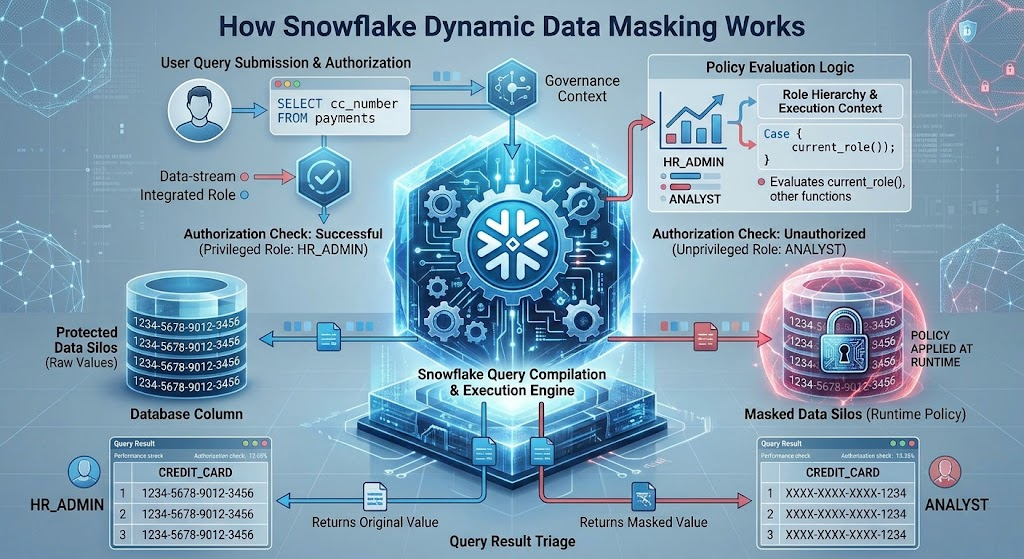
During execution, Snowflake evaluates context functions embedded within the policy definition, such as CURRENT_ROLE(), INVOKER_ROLE(), or custom entitlement checks. If the active role matches the authorized criteria defined in the policy, the engine returns the unmasked data. If the role lacks authorization, the engine substitutes the output with the masked value specified by the policy logic.
Role hierarchy plays a critical role in evaluation. If a user operates under a parent role that inherits privileges from an authorized child role, functions like CURRENT_ROLE() evaluate the specific active session role unless explicit hierarchy functions or custom entitlement tables are integrated into the policy syntax.
Masking policies apply universally across diverse SQL operations referencing the protected column:
- SELECT Statements: Columns appear masked in the final returned result set.
- JOIN Conditions: Masked values are evaluated according to policy rules, which can alter join cardinally if unauthorized roles attempt joins on masked keys.
- WHERE Filters: Filtering on a masked column evaluates against the masked value for unauthorized users, preventing side-channel data leaks.
- GROUP BY and ORDER BY Operations: Aggregations evaluate using the value visible to the executing role.
Because masking occurs dynamically during output generation, the physical data stored in Snowflake micro-partitions remains unchanged. An HR_ADMIN role querying an employee directory sees raw email addresses, whereas a MARKETING_ANALYST role executing the exact same query against the exact same table concurrently receives masked values.
Snowflake Dynamic Data Masking Requirements and Permissions
Deploying Dynamic Data Masking requires satisfying specific edition prerequisites and establishing a clear privilege delegation model. Separation of duties is critical: policy creation and application should be managed by security governance roles rather than general table owners or data engineers.
Prerequisites and role configurations require the following setup:
- Snowflake Edition: Requires Enterprise Edition, Business Critical Edition, or Virtual Private Snowflake (VPS).
- Database Objects: A designated governance database and schema to centralize masking policy definitions.
- Custom Governance Roles: A dedicated role such as SECURITY_ADMIN or MASKING_ADMIN to own and manage policies.
To grant the necessary privileges to a central masking administrator role, execute the following configuration statements:
SQL
-- Create a dedicated security administration role for masking management
USE ROLE ACCOUNTADMIN;
CREATE ROLE IF NOT EXISTS masking_admin;

-- Grant privileges to create masking policies in the governance schema
GRANT USAGE ON DATABASE governance_db TO ROLE masking_admin;
GRANT USAGE ON SCHEMA governance_db.policies TO ROLE masking_admin;
GRANT CREATE MASKING POLICY ON SCHEMA governance_db.policies TO ROLE masking_admin;

-- Grant global privilege to apply masking policies across database tables
GRANT APPLY MASKING POLICY ON ACCOUNT TO ROLE masking_admin;

-- Assign the masking admin role to authorized security personnel
GRANT ROLE masking_admin TO USER corporate_security_officer;
Separating CREATE MASKING POLICY and APPLY MASKING POLICY privileges prevents table owners from unilaterally dropping or bypassing security controls established by corporate compliance teams.
Creating Your First Snowflake Masking Policy
The creation of a masking policy utilizes the CREATE MASKING POLICY command structure. A policy definition consists of input arguments, a return data type, and a conditional SQL expression that determines how data is displayed based on executing role context.
The foundational syntax requires defining the policy name, declaring parameters with their respective data types, specifying the return data type, and writing the conditional logic block:
SQL
CREATE OR REPLACE MASKING POLICY governance_db.policies.email_mask
AS (val STRING)
RETURNS STRING ->
CASE
    WHEN CURRENT_ROLE() IN ('HR_ADMIN', 'ACCOUNTADMIN')
    THEN val
    ELSE '********'
END;
Deconstructing this statement clarifies its operational mechanics:
- Policy Name: email_mask stored within the dedicated governance schema.
- Input Argument: (val STRING) accepts the data type of the column being evaluated.
- Return Data Type: RETURNS STRING dictates the data type of the value returned after masking.
- Conditional Logic: The CASE expression checks the active session role using CURRENT_ROLE(). Authorized roles receive the unmasked column value (val), while any other role receives a redacted string (‘****‘).
Input and output data types within a policy must maintain strict compatibility. If a policy accepts a VARCHAR input, the return type must match or safely cast to a supported data type. Snowflake also supports variant, numeric, timestamp, and boolean data types in masking policy signatures.
Applying a Masking Policy to Snowflake Tables and Views
Once a masking policy is created and stored within a designated schema, database administrators apply the policy to specific table or view columns using standard ALTER statements.
To apply the previously defined email-masking policy to a production table column:
SQL
USE ROLE MASKING_ADMIN;
ALTER TABLE production_db.hr.employee_records
MODIFY COLUMN email
SET MASKING POLICY governance_db.policies.email_mask;
Masking policies can also be attached to columns exposed through database views:
SQL
ALTER VIEW production_db.hr.employee_directory_v
MODIFY COLUMN email
SET MASKING POLICY governance_db.policies.email_mask;
Key operational rules govern policy attachment:
- A single masking policy can be applied to multiple columns across different tables, provided the column data types match the policy argument signature.
- A table column can only have one masking policy assigned at a time. To change a policy, administrators must first unset the existing policy before applying a new one.
- To remove a masking policy from a column without dropping the policy object itself, use the UNSET command:
SQL
ALTER TABLE production_db.hr.employee_records
MODIFY COLUMN email
SET MASKING POLICY governance_db.policies.email_mask;

-- To remove the policy from the column:
ALTER TABLE production_db.hr.employee_records
MODIFY COLUMN email
UNSET MASKING POLICY;
SQL Examples for Different Data Masking Requirements
Different business units require tailored masking implementations depending on regulatory mandates, analytical needs, and data sensitivity levels. The following SQL examples illustrate standard data protection patterns used in enterprise environments.
Partial Masking for Customer Email Addresses
Support personnel and customer service representatives often need to verify customer accounts by viewing email domains without seeing the full personal address. Partial masking preserves domain visibility while redacting the local user portion:
CREATE OR REPLACE MASKING POLICY governance_db.policies.partial_email_mask
AS (val STRING)
RETURNS STRING ->
CASE
    WHEN CURRENT_ROLE() IN ('DATA_ENGINEER', 'ACCOUNTADMIN') THEN val
    WHEN CURRENT_ROLE() IN ('CUSTOMER_SUPPORT', 'SUPPORT_LEAD')
        THEN REGEXP_REPLACE(val, '.+@', '*****@')
    ELSE 'REDACTED'
END;
Returning NULL for Unauthorized Users
When protecting highly sensitive attributes like Social Security numbers or annual compensation figures, displaying a masked string can sometimes create ambiguity. Returning NULL ensures unauthorized roles receive no data whatsoever:
SQL
CREATE OR REPLACE MASKING POLICY governance_db.policies.ssn_null_mask
AS (val STRING)
RETURNS STRING ->
CASE
    WHEN CURRENT_ROLE() IN ('PAYROLL_ADMIN', 'ACCOUNTADMIN') THEN val
    ELSE NULL
END;
Hash-Based Masking for Analytical Anonymization
Organizations sharing data with external partners often utilize cryptographic hashing to obfuscate identifiable values while preserving referential integrity for join operations:
SQL
CREATE OR REPLACE MASKING POLICY governance_db.policies.customer_id_hash_mask
AS (val STRING)
RETURNS STRING ->
CASE
    WHEN CURRENT_ROLE() IN ('INTERNAL_ANALYST', 'ACCOUNTADMIN') THEN val
    ELSE SHA2(val, 256)
END;
Hashing replaces original values with a fixed-length hexadecimal string derived from the SHA-2 algorithm. While hashing prevents direct inspection of raw IDs, administrators must remember that deterministic hashes remain vulnerable to dictionary attacks if the underlying value space is small or predictable.
Protecting Timestamp and Date Columns
Temporal data associated with sensitive operational events requires masking to prevent timeline reconstruction:
CREATE OR REPLACE MASKING POLICY governance_db.policies.timestamp_mask
AS (val TIMESTAMP_NTZ)
RETURNS TIMESTAMP_NTZ ->
CASE
    WHEN CURRENT_ROLE() IN ('SECURITY_AUDITOR', 'ACCOUNTADMIN') THEN val
    ELSE '1970-01-01 00:00:00'::TIMESTAMP_NTZ
END;
Masking Semi-Structured VARIANT Data
JSON payloads stored in VARIANT columns often contain mixed sensitive and non-sensitive attributes. Masking policies can extract and obfuscate specific JSON keys while leaving safe structural elements accessible:
SQL
CREATE OR REPLACE MASKING POLICY governance_db.policies.json_pii_mask
AS (val VARIANT)
RETURNS VARIANT ->
CASE
    WHEN CURRENT_ROLE() IN ('PRIVILEGED_ANALYST', 'ACCOUNTADMIN') THEN val
    ELSE OBJECT_INSERT(val, 'ssn', '***-**-****', TRUE)
END;
Conditional Masking Policies and Role-Based Data Access
Advanced governance architectures require more granular access controls than static role checks provide. When data visibility must be governed by a combination of the user role and contextual record attributes, administrators deploy conditional masking policies.
Conditional masking policies evaluate additional columns within the target table or reference external entitlement tables to determine whether sensitive information should be displayed. This approach allows organizations to restrict data access based on department ownership, regional jurisdiction, or specific security clearance flags stored alongside the record.
The following SQL example demonstrates a conditional masking policy that evaluates both the protected email column and an associated department classification column:
SQL
CREATE OR REPLACE MASKING POLICY governance_db.policies.conditional_email_mask
AS (val STRING, dept STRING)
RETURNS STRING ->
CASE
    WHEN CURRENT_ROLE() IN ('ACCOUNTADMIN', 'SECURITY_ADMIN') THEN val
    WHEN CURRENT_ROLE() = 'HR_ANALYST' AND dept = 'Human Resources' THEN val
    WHEN CURRENT_ROLE() = 'SALES_MANAGER' AND dept IN ('Sales', 'Marketing') THEN val
    ELSE 'RESTRICTED'
END;
When applying a conditional masking policy, administrators must specify the additional conditioning column using the USING clause during the table alteration statement:
SQL
ALTER TABLE production_db.hr.employee_records
MODIFY COLUMN email
SET MASKING POLICY governance_db.policies.conditional_email_mask
USING (email, department_name);
For large enterprises managing thousands of dynamic permissions, hardcoding role names inside policy definitions becomes difficult to maintain. Organizations frequently couple masking policies with custom entitlement mapping tables.
Using the EXISTS operator within a policy expression allows Snowflake to query an authorization mapping table at runtime to verify whether the executing user possesses valid access to a specific record category:
SQL
CREATE OR REPLACE MASKING POLICY governance_db.policies.entitlement_table_mask
AS (val STRING, region_id INT)
RETURNS STRING ->
CASE
    WHEN CURRENT_ROLE() = 'ACCOUNTADMIN' THEN val
    WHEN EXISTS (
        SELECT 1
        FROM governance_db.security.user_region_permissions perm
        WHERE perm.username = CURRENT_USER()
          AND perm.region_id = region_id
          AND perm.access_granted = TRUE
    ) THEN val
    ELSE 'UNAUTHORIZED'
END;
Distinguishing between standard role-based masking and conditional masking ensures appropriate architecture selection. Standard role checks suit broad departmental segregation, whereas conditional policies provide row-level contextual awareness necessary for complex multi-tenant or multi-jurisdictional analytics.
Testing and Verifying Masking Policies in Snowflake
Deploying a masking policy requires rigorous verification before releasing tables to production users. Executing creation statements successfully does not guarantee that access controls function as intended across diverse user roles.
A comprehensive testing methodology involves validating queries across multiple distinct sessions:
- Role Switching: Use the USE ROLE command to switch between administrative, analytical, and restricted user sessions.
- Comparative Querying: Execute identical SELECT statements across roles to verify that sensitive columns display raw values for authorized users and obfuscated data for unauthorized roles.
- Metadata Inspection: Review policy attachments and column associations using system functions and catalog views.
The following testing script demonstrates how an administrator validates email masking behavior across two distinct operational roles:
SQL
-- Test as a privileged administrator role
USE ROLE HR_ADMIN;
SELECT employee_id, email, salary
FROM production_db.hr.employee_records
LIMIT 5;
-- Expected Result: Full unmasked email and salary values displayed.

-- Test as an unprivileged marketing role
USE ROLE MARKETING_ANALYST;
SELECT employee_id, email, salary
FROM production_db.hr.employee_records
LIMIT 5;
-- Expected Result: Masked email string and redacted salary values displayed.
Administrators can inspect policy metadata and verify structural bindings using native inspection commands:
SQL
-- Describe policy arguments, return types, and expression logic
DESCRIBE MASKING POLICY governance_db.policies.email_mask;

-- Retrieve exact DDL used to construct the policy
SELECT GET_DDL('MASKING POLICY', 'governance_db.policies.email_mask');
Managing, Modifying, and Removing Snowflake Masking Policies
Maintaining enterprise security governance requires modifying policies as organizational compliance mandates evolve. Snowflake provides native data definition language commands to manage the lifecycle of masking policy objects.
| SQL Command | Operational Purpose |
| CREATE MASKING POLICY | Instantiates a new masking policy object within a designated schema. |
| ALTER MASKING POLICY | Modifies the internal SQL expression or signature of an existing policy. |
| DROP MASKING POLICY | Deletes an unassigned masking policy from the database schema. |
| SHOW MASKING POLICIES | Lists all available masking policies visible within the current schema or account. |
| DESCRIBE MASKING POLICY | Displays detailed metadata regarding policy arguments, return types, and bindings. |
When updating an existing policy without disrupting active database operations, administrators use ALTER MASKING POLICY to replace the underlying expression:
SQL
ALTER MASKING POLICY governance_db.policies.email_mask
SET BODY ->
CASE
    WHEN CURRENT_ROLE() IN ('HR_ADMIN', 'COMPLIANCE_OFFICER', 'ACCOUNTADMIN')
    THEN val
    ELSE 'MASKED_BY_POLICY'
END;
Before dropping a masking policy object entirely, administrators must disassociate the policy from all active table and view columns. Attempting to drop an attached policy returns a blocking error.
SQL
-- Step 1: Unset the policy from all target table columns
ALTER TABLE production_db.hr.employee_records
MODIFY COLUMN email
UNSET MASKING POLICY;

-- Step 2: Drop the policy object from the governance schema
DROP MASKING POLICY governance_db.policies.email_mask;
Monitoring and Auditing Dynamic Data Masking
Maintaining compliance across enterprise cloud environments requires continuous auditing of data access controls and active security policies. Security operations teams must maintain clear visibility into which database columns are protected by specific masking policies and verify that access controls align with internal governance mandates.
Snowflake provides dedicated system views within the Account Usage schema and shared metadata functions to audit data masking configurations:
- MASKING_POLICIES View: Lists all masking policies created across the account, detailing their owner, creation timestamp, signature, and return data types.
- POLICY_REFERENCES View: Identifies all table and view columns associated with a specific masking policy, helping administrators track object dependencies.
The following SQL queries allow security administrators to audit active masking policies and verify column-level protections across the enterprise account:
SQL
-- Query Account Usage to list all active masking policies in the account
SELECT
    policy_catalog,
    policy_schema,
    policy_name,
    signature,
    return_type,
    created
FROM snowflake.account_usage.masking_policies
WHERE deleted IS NULL
ORDER BY created DESC;

-- Query Policy References to identify all database columns protected by a specific policy
SELECT
    ref_database_name,
    ref_schema_name,
    ref_entity_name,
    ref_column_name,
    policy_name,
    policy_kind
FROM table(snowflake.information_schema.policy_references(
    policy_name => 'governance_db.policies.email_mask'
));
During query performance tuning, administrators can leverage the Query Profile interface in Snowsight to inspect execution plans. While dynamic data masking introduces minimal computational overhead, complex policies referencing large external entitlement tables or multi-branch conditional logic can impact query compilation and execution times, making performance monitoring essential for high-concurrency analytical workloads.
Snowflake Dynamic Data Masking Limitations and Implementation Considerations
While Dynamic Data Masking provides robust column-level security, database architects must evaluate specific platform limitations and structural constraints before deploying policies in production environments.
- Edition Requirements: Dynamic Data Masking requires Snowflake Enterprise Edition or higher. Standard Edition accounts cannot create or apply masking policies.
- Supported Data Types: Masking policies support standard scalar data types, along with timestamps, booleans, and semi-structured VARIANT payloads. However, certain complex geospatial or binary types may have restricted support.
- Materialized Views: Masking policies cannot be directly applied to columns within materialized views if the underlying table columns are already masked, or vice versa, requiring careful planning of view hierarchies.
- Query Operation Behavior: Masked columns used in GROUP BY or ORDER BY clauses evaluate against the value visible to the active user role, which can alter aggregate groupings or sorting results between privileged and unprivileged users.
- Role Hierarchy Interactions: Because policies evaluate the immediate active role via CURRENT_ROLE(), administrators must design policies to accommodate inherited role structures or utilize explicit session checks.
Masking policies serve as a runtime access control mechanism. They should complement, rather than replace, foundational security controls such as network isolation, micro-segmentation, role-based grant management, and end-to-end encryption of data at rest.
Snowflake Dynamic Data Masking vs. External Tokenization
Securing sensitive data columns often involves choosing between native Snowflake features and external security architectures. Understanding the distinction between Dynamic Data Masking and External Tokenization helps data governance teams select the appropriate tool for their compliance requirements.
- Dynamic Data Masking: Operates natively inside Snowflake at query runtime. It evaluates user roles dynamically and obfuscates values on the fly without modifying stored micro-partitions. Original data remains accessible to authorized roles while unauthorized users receive masked representations.
- External Tokenization: Relies on third-party tokenization vaults or proxy services to replace sensitive values with non-sensitive tokens before data enters Snowflake. Un-tokenization requires calls back to the external vault.
Organizations choose Dynamic Data Masking when they require high query performance, granular role-based conditional logic, and simple administration without managing external proxy infrastructure. External tokenization is typically reserved for strict regulatory mandates requiring data to be tokenized before reaching cloud storage repositories.
Troubleshooting Common Snowflake Masking Policy Errors
Deploying and maintaining masking policies occasionally results in operational errors. Understanding the root causes of common failure modes accelerates troubleshooting.
- Insufficient Privileges Error: Occurs when a user attempts to create or apply a policy without holding CREATE MASKING POLICY or APPLY MASKING POLICY privileges. Resolution: Grant necessary permissions from an ACCOUNTADMIN or SECURITY_ADMIN session.
- Drop Policy Failure: Occurs when attempting to drop a policy that remains attached to active table columns. Resolution: Disassociate the policy using ALTER TABLE … UNSET MASKING POLICY before executing the drop command.
- Data Type Mismatch: Triggered when the input argument data type of a policy does not match the data type of the target table column. Resolution: Verify that the policy signature and column data types align perfectly.
- Unexpected Masked Results: Happens when role inheritance hierarchies cause CURRENT_ROLE() to evaluate an unexpected child role during session execution. Resolution: Audit session roles or incorporate multi-level role checks within the policy CASE statement.
Frequently Asked Questions
What is Dynamic Data Masking in Snowflake?
Dynamic Data Masking is a native column-level security feature that obfuscates sensitive database values at query runtime based on the active role of the executing user.
Is Snowflake Dynamic Data Masking available in Standard Edition?
No. Dynamic Data Masking requires Snowflake Enterprise Edition, Business Critical Edition, or a Virtual Private Snowflake environment.
How do you create a masking policy in Snowflake?
Masking policies are created using the CREATE MASKING POLICY statement, specifying input arguments, return data types, and a conditional SQL expression.
How do you apply a masking policy to a table column?
Administrators apply policies using the ALTER TABLE command combined with MODIFY COLUMN and SET MASKING POLICY.
Can Snowflake Dynamic Data Masking hide data based on user roles?
Yes. Policies evaluate user permissions dynamically using functions like CURRENT_ROLE() inside conditional expressions.
Can a Snowflake masking policy partially hide sensitive information?
Yes. Functions such as REGEXP_REPLACE allow administrators to mask portions of a string, such as redacting local email characters while preserving domain names.
Can one masking policy be applied to multiple columns?
Yes. A single policy can protect multiple columns across different tables, provided the column data types match the policy signature.
How do you remove a masking policy from a Snowflake column?
Administrators remove policy associations by executing the ALTER TABLE … MODIFY COLUMN … UNSET MASKING POLICY command.
How can administrators identify which columns have masking policies?
Administrators utilize the POLICY_REFERENCES information schema function and the MASKING_POLICIES account usage view to audit policy associations.
Does Dynamic Data Masking permanently change the original data?
No. Masking occurs dynamically at query runtime; the physical underlying data stored in Snowflake micro-partitions remains fully intact.