
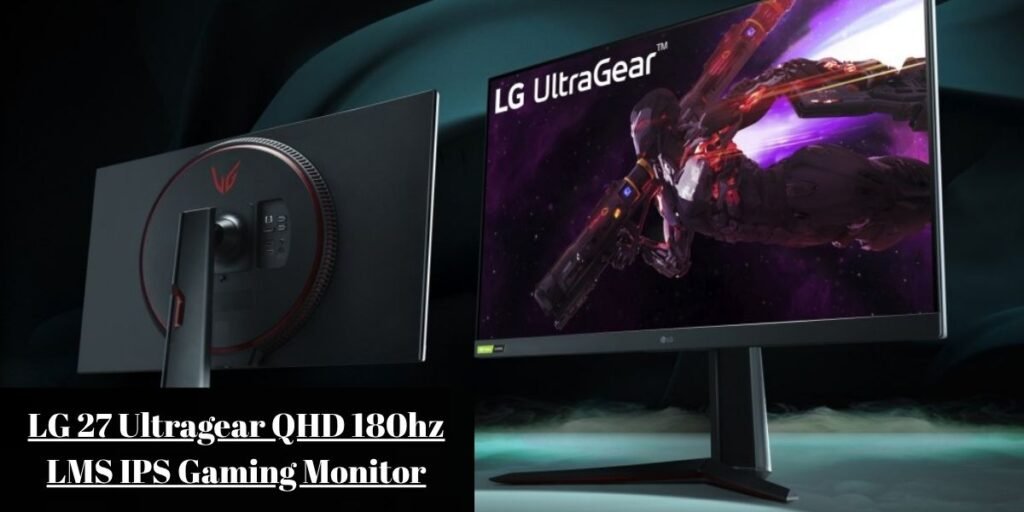
What Is the LG UltraGear 27-Inch QHD 180Hz Gaming Monitor?
Targeting the sweet spot of modern PC gaming performance, the LG UltraGear 27GS75Q-B delivers a balanced blend of sharp visual clarity and high-speed motion handling. Positioned squarely in LG’s mid-range performance lineup, this 27-inch display steps up from basic 1080p monitors by pairing a 2560 × 1440 (QHD) resolution with a fast 180Hz native refresh rate.
Designed primarily for gamers who demand high pixel density alongside competitive frame rates, the panel uses IPS (In-Plane Switching) technology to ensure wide viewing angles and vivid color reproduction. The monitor integrates an advertised 1ms Gray-to-Gray (GtG) response time along with hardware-level support for both NVIDIA G-SYNC Compatible and AMD FreeSync adaptive synchronization protocols.
Standard 27-inch office displays generally cap out at a 60Hz or 75Hz refresh rate with 1080p resolution and basic 8-bit color handling. By contrast, the 27GS75Q-B focuses on minimal input latency, fast pixel transitions, and crisp graphic detail. It bridges the gap between budget-tier competitive screens and ultra-expensive high-end displays, offering PC enthusiasts a high-value display upgrade for fast-paced shooters, open-world RPGs, and everyday desktop workflows.
LG UltraGear 27GS75Q-B Specifications
| Feature | Specification |
| Model Number | 27GS75Q-B |
| Screen Size | 27 Inches |
| Panel Type | IPS (In-Plane Switching) |
| Native Resolution | 2560 × 1440 (QHD) |
| Aspect Ratio | 16:9 |
| Native Refresh Rate | 180Hz |
| Overclocked Refresh Rate | 200Hz (via DisplayPort 1.4) |
| Response Time | 1ms GtG (Faster Setting) |
| Typical Brightness | 300 cd/m² |
| Typical Contrast Ratio | 1000:1 |
| Color Gamut | 99% sRGB (Typical) |
| HDR Support | HDR10 |
| Adaptive Sync | NVIDIA G-SYNC Compatible, AMD FreeSync |
| Connectivity | 2 × HDMI 2.0, 1 × DisplayPort 1.4, 3.5mm Headphone Out |
| Ergonomics | Height (110mm), Tilt (-5° to +15°), Pivot (Clockwise) |
| VESA Mount | 100 × 100 mm |
How Good Is the QHD IPS Display on a 27-Inch Screen?
A resolution of 2560 × 1440 pixels offers 77% more screen real estate than a standard 1080p (1920 × 1080) Full HD display. On a 27-inch physical diagonal, this yields a pixel density of roughly 108 pixels per inch (PPI). This specific ratio represents an ideal balance for desktop viewing: text appears sharp without requiring Windows display scaling, while game textures retain fine detail without putting excessive rendering strain on mid-tier graphics cards.
The underlying IPS panel ensures consistent color delivery across 178-degree horizontal and vertical viewing angles. Unlike budget TN (Twisted Nematic) panels that suffer from severe color shifting when viewed off-center, or VA (Vertical Alignment) panels that can shift gamma, the IPS structure maintains accurate hues across the entire surface.
Covering 99% of the sRGB color space, the 27GS75Q-B provides natural color rendering suitable for photo editing, digital content creation, and web browsing. Color reproduction leans vibrant out of the box without looking unnaturally oversaturated.
The display delivers a typical brightness of 300 nits alongside a standard 1000:1 static contrast ratio. In well-lit rooms or standard office setups, 300 nits is more than adequate for combatting glare. However, the 1000:1 contrast ratio means that deep blacks can look slightly gray in a pitch-black room—an inherent trait of standard IPS technology when compared to the deep blacks of VA panels or the self-lit pixels of OLED displays.
Does the 180Hz Refresh Rate Make a Noticeable Difference in Gaming?
Upgrading from a traditional 60Hz or 75Hz display to a 180Hz refresh rate fundamentally alters the smoothness of on-screen motion. A 60Hz monitor updates the displayed image once every 16.67 milliseconds, whereas a 180Hz display updates the screen every 5.55 milliseconds. This higher update frequency dramatically reduces motion blur, makes cursor tracking smoother, and provides immediate visual feedback to mouse inputs.
While the jump from 60Hz to 144Hz is the most dramatic visual improvement, moving up to 180Hz adds an extra layer of fluidity that fast-paced competitive players will appreciate. In titles like Counter-Strike 2, Valorant, Apex Legends, and Overwatch 2, tracking fast-moving targets becomes significantly easier because target positions update more frequently on screen.
To make full use of a 180Hz panel, your graphics card must generate frame rates that match or approach 180 FPS at 1440p resolution. Casual gamers playing slower-paced strategy or single-player narrative titles will still notice smoother camera panning and reduced eye strain during extended play sessions.
LG also includes a hardware 200Hz overclocking mode on the 27GS75Q-B. When enabled through the monitor’s OSD menu and connected via a compatible DisplayPort 1.4 cable, the panel updates every 5.0 milliseconds. While 180Hz serves as the stable native baseline, the 200Hz mode provides an extra competitive edge for high-end GPU setups capable of hitting 200 FPS at QHD.
Understanding the 1ms Response Time and Motion Clarity
The advertised 1ms response time represents a pixel transitions measurement known as Gray-to-Gray (GtG). GtG calculates how quickly an individual LCD pixel shifts from one shade of gray to another. Fast response times prevent motion trails, image smearing, and ghosting artifacts behind fast-moving objects on screen.
It is vital to distinguish pixel response time from input lag and refresh rate:
- Refresh Rate: Measures how many full screen frames the monitor displays each second (e.g., 180Hz equals 180 updates per second).
- Input Lag: Measures the latency between submitting a control input (like clicking a mouse) and seeing the resulting action register on screen.
- GtG Response Time: Measures how fast liquid crystal molecules physically rotate to change pixel color values.
LG achieves its 1ms GtG spec by utilizing the panel’s Faster overdrive setting in the On-Screen Display (OSD) menu. While this aggressive pixel overdrive reduces trailing in fast-paced scenarios, pushing overdrive too aggressively can induce inverse ghosting (overshoot), producing bright halos behind moving objects. Setting the overdrive mode to Fast rather than Faster typically offers the cleanest balance of motion clarity without noticeable overshoot during real-world gameplay.
NVIDIA G-SYNC Compatible and AMD FreeSync: What Do They Add?
Variable Refresh Rate (VRR) technology solves a fundamental disconnect between fixed-refresh-rate displays and variable graphics card performance. When your GPU renders frames at a speed that does not align with your monitor’s fixed update cycle, visual artifacts occur:
- Screen Tearing: Occurs when the graphics card sends a partial new frame while the monitor is mid-draw, splitting the displayed image horizontally across the screen.
- Display Stutter: Happens when the monitor repeats an identical frame while waiting for the GPU to finish rendering the next one, creating micro-pauses.
The LG 27GS75Q-B features official certification for NVIDIA G-SYNC Compatible alongside native support for AMD FreeSync. Enabling adaptive synchronization allows the display to continuously match its refresh rate to the real-time frame rate produced by your graphics card across its supported VRR range (typically 48Hz to 180Hz/200Hz).
Whether your frame rate drops to 90 FPS in demanding graphical scenes or swings up to 180 FPS in light areas, adaptive sync ensures smooth, tear-free frame delivery without adding the latency penalties associated with traditional V-Sync.
HDR10, Color Reproduction, and Other Gaming Features
Beyond core panel specs, the 27GS75Q-B integrates hardware utility tools and software enhancements designed to improve in-game visibility and operational comfort:
- HDR10 Support: While the monitor accepts an HDR10 video signal, true high-dynamic-range requires localized dimming zones and extreme peak brightness. With a 300-nit typical brightness and an edge-lit IPS contrast profile, HDR10 here serves as a basic signal compatibility feature rather than delivering true local-dimming HDR performance.
- Black Stabilizer: Dynamically brightens dark, shadowed areas without overexposing lighter sections of the screen, making it easier to spot targets hiding in dark corners.
- Dynamic Action Sync (DAS): Bypasses unnecessary internal monitor image processing, reducing signal processing delay so inputs register on screen in real time.
- Crosshair Overlay and FPS Counter: Places a hardware-level reticle in the center of the screen to assist hip-fire accuracy in shooter games, while the built-in FPS counter provides real-time frame rate monitoring without third-party software overlays.
- Flicker Safe and Reader Mode: Employs a direct-current backlighting system to eliminate screen flicker, while Reader Mode reduces blue light emission to limit eye strain during extended work sessions.
Design, Stand Adjustments, and Connectivity
The physical chassis of the 27GS75Q-B features LG’s signature 3-side virtually borderless design, placing slim bezels on the top and sides for seamless multi-monitor desktop arrangements.
The included ergonomic stand offers versatile physical adjustability:
- Height Adjustment: Up to 110mm of vertical travel to align the center of the screen with your eye level.
- Tilt Range: Adjusts from -5 degrees forward to +15 degrees backward for comfortable viewing angles.
- Pivot Functionality: Rotates 90 degrees clockwise into portrait mode, ideal for coding, reading long documents, or vertical stream management.
The rear input panel houses two HDMI 2.0 ports, one DisplayPort 1.4 connection, and a 3.5mm headphone output jack. Connecting via DisplayPort 1.4 is mandatory to unlock the full 180Hz refresh rate at 1440p (and the 200Hz overclocked mode). HDMI 2.0 connections cap out at lower refresh rates for 1440p resolution.
The monitor does not feature built-in speakers or USB-C pass-through ports. Gamers must connect external desktop speakers or a gaming headset to the 3.5mm audio jack or directly to their PC. If you plan to mount the display on an aftermarket monitor arm, a standard 100 × 100 mm VESA mounting pattern is located on the rear panel.
What Are the Limitations of the LG UltraGear 27GS75Q-B?
To make an informed purchase decision, evaluate the trade-offs associated with this panel technology:
- Entry-Level HDR: The 300-nit maximum brightness and lack of local dimming mean HDR content will look similar to standard SDR content.
- Standard IPS Contrast Ratio: A static 1000:1 contrast ratio cannot reproduce pitch-black scenes like VA panels or self-emissive OLED screens, showing mild “IPS glow” in dark rooms.
- Overdrive Tuning: Using the maximum 1ms Faster setting can cause noticeable inverse ghosting; the Fast setting provides a cleaner real-world balance.
- DisplayPort Required for Full Speed: Reaching the maximum 180Hz native refresh rate (and 200Hz OC) requires a DisplayPort 1.4 graphics card connection.
- Lack of Extra Features: Missing built-in speakers, a USB hub, and USB-C connectivity means cable management relies entirely on your PC tower setup.
Is the LG UltraGear 27-Inch QHD 180Hz Monitor Worth Buying?
The LG UltraGear 27GS75Q-B stands out as a sweet-spot monitor upgrade for PC gamers transitioning from 1080p up to 1440p. It pairs vibrant IPS color accuracy and wide viewing angles with the fast motion delivery of a 180Hz native refresh rate.
This display is an ideal choice for:
- Competitive shooter players wanting crisp motion tracking alongside clear QHD target visibility.
- Gamers looking for a well-rounded 27-inch desktop screen for both gaming and general productivity.
- Mid-to-high-range GPU owners capable of outputting 100+ FPS at 2560 × 1440 resolution.
If your primary focus is deep black levels for dark-room horror gaming or true local-dimming HDR performance, an OLED or Mini-LED monitor would serve you better—though at a significantly higher price point. For high-speed 1440p gaming performance backed by reliable IPS color reproduction, the 27GS75Q-B delivers exceptional real-world value.
Frequently Asked Questions
Is the LG UltraGear 27GS75Q-B a 1440p gaming monitor?
Yes, it features a native QHD resolution of 2560 × 1440 pixels, providing significantly higher pixel density and detail than a standard 1080p display.
Does the LG UltraGear 27GS75Q-B support 180Hz or 200Hz?
The monitor runs at a native 180Hz refresh rate out of the box. It includes an optional 200Hz overclocking mode accessible through the OSD menu when connected via DisplayPort 1.4.
Is the LG UltraGear 27GS75Q-B really a 1ms monitor?
LG specifies a 1ms GtG response time when utilizing the Faster overdrive setting in the OSD menu. For general gameplay, using the Fast setting minimizes inverse ghosting while maintaining crisp motion clarity.
Does the LG 27GS75Q-B support NVIDIA G-SYNC?
Yes, it is officially certified as NVIDIA G-SYNC Compatible and includes native support for AMD FreeSync to prevent screen tearing and stutter.
Is the LG UltraGear 27GS75Q-B suitable for PS5 and Xbox Series X gaming?
Yes, consoles connect via the HDMI 2.0 ports. The monitor accepts 1440p or downscaled 4K signals from consoles, running at up to 120Hz depending on console video output settings.
Does the LG UltraGear 27GS75Q-B have built-in speakers?
No, it does not include internal speakers. It includes a 3.5mm headphone output jack on the back panel to pass audio through to headphones or external desktop speakers.
Can the LG UltraGear 27GS75Q-B be wall-mounted?
Yes, the monitor features standard 100 × 100 mm VESA screw holes on the rear, allowing you to detach the factory stand and attach it to a monitor arm or wall bracket.