
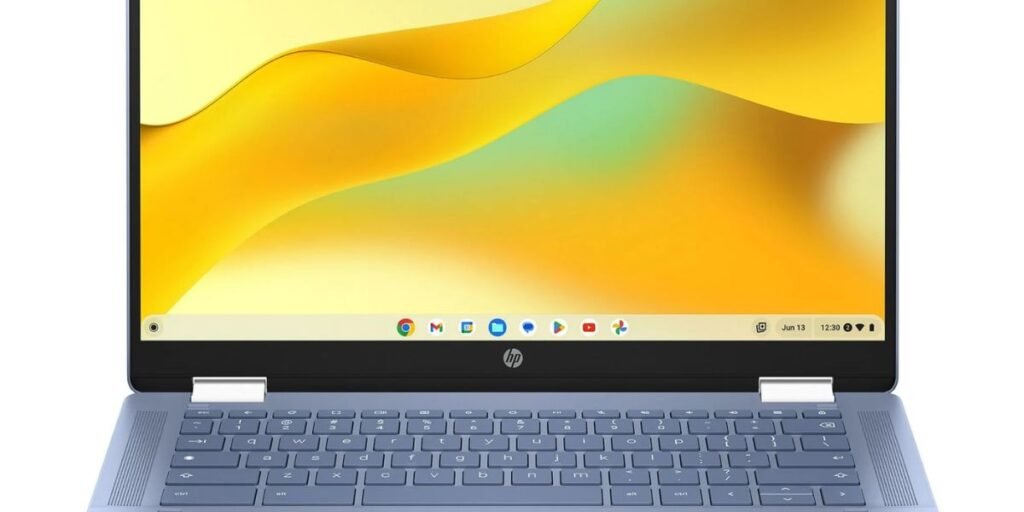
Selecting a convertible laptop requires looking past marketing claims to evaluate how hardware, operating system capabilities, and physical design interact during daily work. The HP Chromebook x360 series occupies a prominent position in the mid-range Chromebook market, offering a 360-degree hinge paired with a full high-definition touch display. It appeals directly to students, remote professionals, and casual users who want a versatile machine for browser-centric tasks, media streaming, and mobile productivity.
The primary question for prospective buyers in 2026 is whether a ChromeOS 2-in-1 convertible with an FHD IPS touchscreen offers enough performance, display quality, and battery endurance to justify its cost over traditional clamshell laptops or budget Windows machines. Evaluating this requires examining the hardware under real-world stress rather than relying solely on specification sheets.
The HP Chromebook x360 name spans multiple iterations and model codes. This analysis focuses specifically on modern mainstream configurations, such as the HP Chromebook x360 14b-cd0010nr and related 14-inch Intel-powered variants. Knowing the exact underlying component architecture prevents costly mistakes caused by confusing lower-tier Celeron models with higher-performing Core-series or N-series versions.
The following comprehensive breakdown examines seven essential areas of this laptop, covering real-world multitasking limits, thermal behavior under load, hinge mechanics, battery longevity, input comfort, software shelf-life, and practical buy-recommendations.
HP Chromebook x360 Specifications and Configuration Details
To make an informed buying decision, buyers must inspect the precise hardware details of the configuration under review. The specifications listed below highlight the popular HP Chromebook x360 14b-cd0010nr configuration, providing a concrete baseline for performance expectations.
| Hardware Feature | Specification Details |
| Model Name | HP Chromebook x360 14b-cd0010nr |
| Processor | Intel Core i3-N305 (8 Cores, 8 Threads, up to 3.80 GHz, 6MB Cache) |
| Display | 14.0-inch diagonal, FHD (1920 x 1080), IPS, edge-to-edge glass, touch, 250 nits |
| Memory | 8GB LPDDR5-4800 MHz RAM (Onboard, non-upgradable) |
| Storage | 128GB UFS storage |
| Graphics | Integrated Intel UHD Graphics |
| Operating System | ChromeOS (Automatic updates supported through Google policy) |
| Battery & Power | 2-cell, 47 Wh Li-ion polymer; up to 10 hours and 15 minutes (HP estimate) |
| Charging | 45W USB Type-C power adapter (Supports USB Power Delivery) |
| Weight & Dimensions | Approx. 3.32 lbs (1.51 kg); 12.72 x 8.68 x 0.81 inches |
| Webcam & Audio | HP Wide Vision 720p HD camera with temporal noise reduction and dual digital mics; stereo speakers |
| Connectivity | Wi-Fi 6E (2×2), Bluetooth 5.3, 2x USB Type-C (5Gbps, Power Delivery, DisplayPort 1.4), 1x USB Type-A (5Gbps), MicroSD reader, headphone/mic combo |
| Warranty | 1-Year Limited Hardware Warranty (Regional terms apply) |
1. Everyday Performance: How Well Does It Handle Real Work?
Processor architecture defines how responsive a Chromebook feels when transitioning from simple web browsing to dense multitasking. Configurations built on the Intel Core i3-N305 utilize eight efficient cores built on Intel’s 7 process. This processor yields significant single-core and multi-core improvements over older dual-core Celeron or Pentium N-series chips, allowing ChromeOS to execute script-heavy webpages without sluggishness.
Equipped with 8GB of LPDDR5 RAM, the x360 handles heavy tab usage effectively. Users can comfortably maintain 15 to 20 active browser tabs while actively participating in a Google Meet video conference, editing a complex document in Google Docs, and streaming background audio. The system manages memory allocation smoothly, preventing the aggressive background tab reloading common on budget 4GB RAM models.
Storage technology plays an equally critical role in system responsiveness. Models equipped with 128GB UFS storage deliver significantly faster read and write speeds than legacy eMMC 5.1 storage. Application launch times for Android apps are noticeably shorter, and local file transfers move without choking the system bus.
While the laptop excels at cloud-native tasks, productivity drops when pushing into heavy local compute workloads. Running multiple resource-intensive Linux (Crosini) container applications, such as local code compilers or basic video editors like Shotcut, will push the integrated Intel UHD Graphics and passive CPU limits to their boundary. For web-based workflows, research, administrative tasks, and video calls, the performance headroom remains entirely adequate.
2. Heat and Fan Noise: Will It Get Uncomfortable During Long Sessions?
Thermal management directly affects comfort during extended typing and study sessions. HP employs a fanless thermal design on many N-series x360 configurations, relying on internal heat spreaders and passive chassis dissipation rather than active mechanical cooling.
Under ordinary workloads, such as writing documents, checking email, or watching HD videos, the laptop operates in complete silence. There is no mechanical fan noise to disrupt quiet classroom environments or library study rooms. Surface temperatures on the keyboard deck stay cool to the touch, generally hovering between 30°C and 34°C (86°F to 93°F) in typical indoor ambient conditions.
When subjected to sustained heavy loads, such as continuous 1080p video meetings with screen sharing or running background Android games, heat accumulates gradually along the underside near the rear hinge. Under peak stress, bottom surface temperatures can reach 41°C to 43°C (105°F to 109°F).
While these surface temperatures are safe for internal components, using the device directly on a bare lap or soft bed cover during intensive tasks can restrict passive heat dissipation. ChromeOS will automatically throttle CPU clock speeds if internal temperatures hit thermal limits, preserving system stability at the expense of peak processing speeds. Resting the laptop on a hard desk surface maintains optimal airflow and keeps the chassis at comfortable working temperatures.
3. Portability in Daily Use: Is It Comfortable to Carry and Work With?
Physical dimensions dictate whether a 2-in-1 fits seamlessly into a mobile lifestyle. Weighing approximately 3.32 lbs (1.51 kg) with a thickness of 0.81 inches, the 14-inch HP Chromebook x360 is slightly heavier than traditional non-convertible 14-inch laptops due to the extra weight of the touch layer, glass panel, and reinforced 360-degree dual-hinge mechanism.
For students and daily commuters, the laptop slides easily into standard backpacks and commuter bags. The included 45W USB-C charger is compact and lightweight, avoiding the bulk of traditional multi-brick power supplies.
The 360-degree hinge offers excellent flexibility in tight quarters. On crowded airplane tray tables or small university lecture desks, folding the device into stand mode or tent mode pulls the display closer to the user while reducing the footprint occupied by the keyboard.
The primary physical trade-off occurs in handheld tablet mode. Holding a 3.32-pound, 14-inch device in one hand to read ebooks or review PDFs becomes tiring after ten to fifteen minutes. The device serves exceptionally well as a convertible desk or lap machine, but it cannot match the ergonomic comfort of a dedicated lightweight slate tablet like an iPad or Android tablet.
The screen brightness rating sits at 250 nits, which is standard for mid-range Chromebooks. Indoors, under normal office or classroom lighting, the display looks clear and vivid. Outdoors in direct sunlight, the combination of a 250-nit backlight and a reflective glossy IPS glass screen creates noticeable glare, requiring users to seek shade for comfortable viewing.
4. Battery Life and Charging: Can It Last Through a Working Day?
Battery reliability remains a core buying consideration for users who work away from wall outlets. HP advertises an estimated runtime of up to 10 hours and 15 minutes for the 47 Wh battery under ideal testing conditions.
Real-world battery consumption varies based on screen brightness and background activity:
- Light Productivity Workflow: Web browsing, offline document typing, and moderate music playback at 50% brightness typically yield 8 to 9 hours of continuous operation.
- Continuous Video Streaming: Streaming 1080p YouTube or Netflix content over Wi-Fi at 70% screen brightness results in 6.5 to 7.5 hours of playback.
- Heavy Multitasking & Video Calls: Simultaneous web browsing, active Android apps, and high-frequency Google Meet video calls drop real-world endurance down to 4.5 to 5.5 hours.
Charging performance is convenient thanks to USB Power Delivery support across both USB Type-C ports. Using the included 45W AC adapter, the battery charges from 0% to 50% in roughly 45 minutes when the device is idle. A complete charge takes approximately 1 hour and 50 minutes.
The ability to charge via standard USB-C means users can power the laptop using third-party fast chargers, multi-port GaN wall blocks, or high-output power banks capable of supplying at least 30W to 45W over Power Delivery, reducing the need to carry proprietary chargers.
5. The Touchscreen and 360-Degree Hinge: When Are They Actually Useful?
The convertible form factor introduces structural and software flexibility that changes how a laptop fits into a daily routine. The 14-inch Full HD (1920 x 1080) IPS touchscreen responds accurately to finger inputs, tap gestures, pinch-to-zoom scaling, and multi-finger scrolling.
The 360-degree dual-torque hinge enables four distinct operational modes:
- Laptop Mode: Operates as a standard clamshell for heavy typing, essay writing, and spreadsheet management.
- Stand Mode: Positions the keyboard face-down on a flat surface, bringing the display closer for watching videos or attending virtual meetings.
- Tent Mode: Forms an inverted V-shape that maximizes stability on narrow desks, counter surfaces, or airplane tray tables.
- Tablet Mode: Folds the display flat against the underside of the chassis, automatically disabling physical keyboard input to prevent accidental keystrokes.
Touch functionality enhances navigation when running Android applications downloaded from the Google Play Store. Mobile games, educational apps, and document annotation tools feel far more intuitive when navigated directly by touch rather than with a mouse cursor.
For users interested in digital note-taking or sketching, pen support requires careful verification. Select HP Chromebook x360 configurations support USI (Universal Stylus Initiative) active pens, enabling pressure-sensitive drawing and handwriting input. However, HP rarely bundles an active stylus in the box, requiring a separate purchase. Buyers must check their specific model number to confirm USI compatibility before purchasing a stylus.
6. Keyboard, Webcam, and Connectivity: Is It Practical for Study and Remote Work?
Daily productivity depends heavily on input ergonomics and peripheral connectivity. The keyboard layout on the HP Chromebook x360 follows standard ChromeOS conventions, featuring dedicated top-row navigation keys and a search key in place of traditional function keys.
Key travel measures approximately 1.3mm to 1.4mm, providing a satisfying tactile response for long typing sessions. Keycap spacing is well proportioned, preventing cramped fingers. Select mid-range configurations include multi-stage white keyboard backlighting, allowing users to type comfortably in dim study rooms or nighttime settings.
The trackpad uses a smooth plastic surface with support for ChromeOS multi-touch gestures, such as three-finger swipe tab switching and two-finger scrolling. Palm rejection functions reliably, preventing accidental cursor movements while typing.
Video calls are handled by an HP Wide Vision 720p HD webcam equipped with integrated temporal noise reduction and dual digital array microphones. In well-lit environments, the camera produces clear images suitable for remote meetings and online classes. In low-light environments, image noise increases noticeably. A physical webcam privacy shutter is included on many configurations, allowing users to block the lens at the hardware level.
Port distribution is practical for modern accessories:
- Two USB Type-C Ports (5Gbps): Positioned on opposite sides of the chassis; both support USB Power Delivery charging and DisplayPort 1.4 video output to external monitors.
- One USB Type-A Port (5Gbps): Allows direct connection of legacy flash drives, mice, or external keyboards without needing dongles.
- MicroSD Card Reader: Offers easy storage expansion for media files and local documents.
- 3.5mm Headphone/Microphone Combo Jack: Connects wired headsets reliably.
Wireless connectivity includes Wi-Fi 6E (2×2) and Bluetooth 5.3, ensuring fast wireless network throughput and stable connections with wireless headphones and mice.
7. ChromeOS, Storage, and Long-Term Support: What Could Limit Its Usefulness?
Understanding operating system boundaries prevents unrealistic expectations. ChromeOS is a lightweight, cloud-focused operating system optimized for web applications, Google Workspace productivity tools, and Android applications.
Prospective buyers must recognize that ChromeOS cannot natively run legacy Windows (.exe) desktop applications, specialized accounting software, or professional creative suites like Adobe Premiere Pro or AutoCAD. Most mainstream tasks, such as Microsoft 365 web editing, Zoom conferencing, and web-based photo editing through Canva or Photopea, run seamlessly inside the browser.
Local storage constraints require attention. While entry-level Chromebooks often ship with limited 64GB eMMC storage, higher-tier x360 configurations offer 128GB UFS or SSD storage. Because ChromeOS relies heavily on cloud sync through Google Drive, 128GB is sufficient for local offline documents, cached media, and Android apps. Users who store large video libraries locally can expand capacity via the MicroSD card slot.
Google’s Automatic Update Expiration (AUE) policy determines the software shelf-life of every Chromebook. Modern HP Chromebook x360 models released in recent years receive up to 10 years of automatic platform and security updates from their release date. Verifying the exact AUE date on Google’s official support directory ensures the device will receive continuous security patches for years to come.
What Can You Realistically Do With the HP Chromebook x360?
Matching laptop capabilities to real-world user needs helps buyers evaluate suitability:
- For Students: Excels at research, essay writing, online classes, and collaborating via Google Docs. The convertible design allows easy reading in tent or tablet mode, though pen compatibility should be checked for handwritten math notes.
- For Office & Remote Work: Handles cloud business tools, web-based CRMs, email, and virtual meetings smoothly. The dual USB-C ports make connecting external monitors and desk hubs straightforward.
- For Home Entertainment: Functions well as a portable media player. Convertible viewing modes make watching Netflix or YouTube comfortable on kitchen counters or beds, supported by crisp IPS viewing angles.
- For Travel & Mobile Use: The compact charger, Wi-Fi 6E connectivity, and solid battery life suit coffee shop working and commuting, though direct outdoor sunlight usage is limited by screen brightness.
- For Creative Tasks: Suitable for basic web graphic design and photo touch-ups, but unsuitable for heavy multi-track video editing, 3D rendering, or complex digital audio workstations.
HP Chromebook x360 Advantages and Drawbacks
Advantages
- Smooth everyday multitasking supported by modern multi-core processors and 8GB RAM.
- Versatile 360-degree hinge adapts easily to tight workspaces and media viewing.
- Silent operation under everyday workloads due to efficient thermal design.
- Full HD IPS touchscreen delivers wide viewing angles and clear text indoors.
- Dual USB-C ports support charging, fast data transfer, and external display output.
- Up to 10 years of automatic security updates on current-generation hardware.
Drawbacks
- Screen brightness capped at 250 nits produces visible reflection under bright sunlight.
- 3.32-pound chassis weight makes prolonged single-handed tablet use uncomfortable.
- Onboard LPDDR5 RAM is soldered and cannot be upgraded after purchase.
- Operating system limits native execution of Windows desktop software.
HP Chromebook x360 Price, Deals, and Where to Buy It Safely
Finding the right price point requires navigating retailer listings carefully, as configurations vary across regional markets.
Check HP’s Official Store First
Start by checking HP’s official regional online store to establish the baseline retail price and review official spec sheets. Official store listings confirm accurate model numbers, warranty terms, and bundled accessories.
Compare Established Retailers
Check verified electronic retailers and authorized distributors before purchasing. In international markets, pricing generally ranges between $350 and $550 USD depending on whether the configuration includes 64GB eMMC or 128GB UFS/SSD storage.
When purchasing in local Asian markets like Pakistan, imported models sold through online marketplaces or local tech hubs often reflect fluctuating exchange rates, import duties, and vendor margins. Expect local Pakistani market prices to hover between PKR 95,000 and PKR 140,000 for verified new or open-box 14-inch N-series units.
How to Judge Whether a Deal Is Worth It
- RAM Configuration: Avoid paying full price for 4GB RAM configurations; prioritize 8GB RAM for smooth multi-tab productivity.
- Storage Type: Verify that the storage is 128GB UFS or SSD rather than slower 64GB eMMC.
- Refurbished Considerations: If buying open-box or refurbished units, verify battery cycle count, hinge stability, screen glass condition, and original charger compatibility. Ensure the seller offers at least a 30-day return window.
Avoid Common Buying Traps
Be cautious of listings that simply state “HP Chromebook x360 14” without giving an exact model code (e.g., 14b-cd0010nr). Older versions using outdated dual-core Intel Celeron N4020 processors look similar externally but offer drastically lower performance than modern Core i3-N305 or N100/N200 models. Always cross-check processor model numbers before paying.
Is the HP Chromebook x360 Worth Buying in 2026?
The HP Chromebook x360 remains a practical, well-balanced choice for users whose daily computer usage centers around web browsers, web-based productivity platforms, media streaming, and light Android apps. Its combination of an FHD IPS touchscreen, flexible 360-degree hinge, quiet thermal design, and robust battery life creates a versatile device for students and remote workers.
Buyers requiring Windows-specific desktop software, heavy video editing tools, or dedicated PC gaming hardware should look toward Windows laptops or MacBook options. For cloud-focused workflows, the HP Chromebook x360 delivers an efficient, low-maintenance computing experience that offers strong value when purchased at competitive market prices.
Frequently Asked Questions
Does the HP Chromebook x360 run hot during normal use?
Under normal workloads like document typing and web browsing, the chassis stays cool and silent. During prolonged 1080p video calls or heavy background processing, warmth accumulates near the rear underside, but surface temperatures remain within safe operating limits on flat surfaces.
Can the HP Chromebook x360 handle multiple browser tabs and video calls?
Yes. Configurations equipped with modern Intel N-series or Core i3 processors paired with 8GB RAM manage 15 to 20 active browser tabs while running video calls without significant slowdowns or aggressive tab reloading.
How long does the HP Chromebook x360 battery last in real-world use?
While HP advertises up to 10 hours, real-world productivity at 50% brightness averages 8 to 9 hours. Continuous video streaming yields roughly 7 hours, while heavy video conferencing reduces battery life to 4.5 to 5.5 hours.
Is the HP Chromebook x360 comfortable to carry every day?
At 3.32 lbs, it carries easily in backpacks and commuter bags alongside its small USB-C charger. It is comfortable to use as a flexible laptop, though holding it in one hand as a tablet gets heavy during long reading sessions.
Can the HP Chromebook x360 run Microsoft Office and Windows software?
It cannot run native Windows (.exe) installer files. Users work with Microsoft 365 through web browsers (Word, Excel, PowerPoint) or access files through Android web apps and Google Workspace alternatives.
Does the HP Chromebook x360 support a stylus?
Select x360 models support USI (Universal Stylus Initiative) active pens, but support varies by exact configuration. Active pens are rarely included in the box and must be verified and purchased separately.
How can I check whether an HP Chromebook x360 is still receiving updates?
Check Google’s official Auto Update Expiration (AUE) list online by searching for the exact HP model name. Current x360 models receive up to 10 years of security updates from their platform release date.
Where can I buy the HP Chromebook x360 at a good price?
Check HP’s official web store alongside authorized electronics retailers. Always verify processor specifications, RAM capacity, and warranty coverage before completing your purchase.