
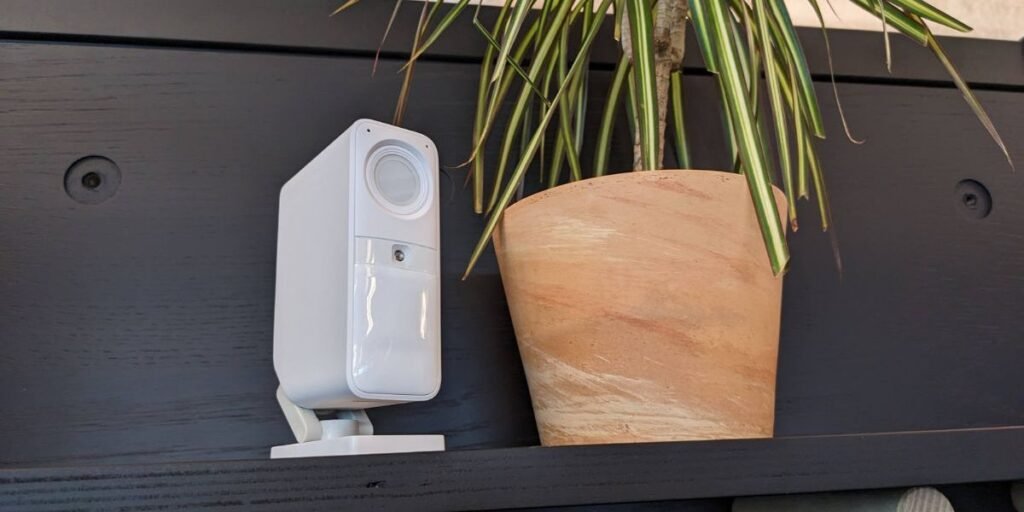
Evaluating modern home security hardware reveals that many indoor devices operate in total isolation from the primary alarm infrastructure. Homeowners frequently purchase independent battery-powered cameras that record motion events locally or in the cloud without communicating with the central security hub during an intrusion. SimpliSafe has engineered a different approach with the SimpliSafe Smart Alarm Wireless Indoor Security Camera, tying optical surveillance directly into the core ecosystem. Its onboard motion detection can trigger an active alarm state, and with qualifying professional monitoring subscriptions, live monitoring agents can leverage Intruder Intervention to view feeds and speak directly through the device during an emergency.
The practical question for homeowners is whether this hardware justifies integration into an existing setup, or if standard standalone cameras serve better. This guide explores the hardware specifications, system compatibility, alarm behavior, recording capabilities, installation requirements, battery performance, placement strategies, privacy controls, and professional monitoring features to help you decide.
SimpliSafe Smart Alarm Wireless Indoor Security Camera Review
The SimpliSafe Smart Alarm Wireless Indoor Security Camera stands apart from legacy indoor devices through a rich specification set combined with deep ecosystem integration. Key hardware features include 1536p high-definition video, a 125-degree diagonal field of view, 10x digital zoom, infrared night vision, two-way audio, AI-powered motion detection, human and pet distinction, an 80 dB built-in siren, a rechargeable battery, a physical privacy shutter, and wireless live streaming.
Conventional indoor cameras simply notify a user that an event occurred. This camera participates directly in what happens next. The onboard AI classifies detected movement, determines whether a human is present, and can trigger the physical alarm. On qualifying plans, monitoring agents can review footage and communicate with trespassers.
The device shines brightest in specific deployment scenarios. It represents an excellent addition for households already utilizing a Gen 3 SimpliSafe system, particularly those maintaining professional monitoring. It also suits spaces where running permanent power cables is difficult. Conversely, it is less compelling for users seeking an inexpensive, standalone camera operating outside a dedicated security ecosystem.
SimpliSafe Smart Alarm Indoor Camera Specs
Understanding the technical foundation of the hardware helps determine how it fits into your home network and physical layout.
- Video Resolution: 1536p HD
- Field of View: 125° diagonal
- Digital Zoom: 10x
- Image Format: 1:1
- Night Vision: Infrared night vision
- Motion Detection: AI-powered human and pet recognition
- Siren: 80 dB built-in alarm
- Audio: Two-way live audio
- Privacy Shutter: Integrated physical shutter
- Power Source: Rechargeable battery or USB power
- Battery Life: Up to 3 months depending on placement and usage
- Wi-Fi Compatibility: 2.4 GHz wireless networks
- Dimensions: 4.53 × 1.46 × 2.95 inches
- Weight: 0.50 lb including mount
- System Requirement: SimpliSafe Gen 3 system
- Storage: Cloud recording and 30-day storage with select plans
What Comes With the SimpliSafe Camera
Unboxing the retail package reveals a streamlined set of hardware components designed for flexible installation.
The box includes the camera unit with its adjustable stand, a 10-foot USB charging cable, a mounting wall plate, and a standard screw installation kit.
One critical detail often missed during unboxing is that a USB power adapter is not included in the box. SimpliSafe installation guidelines specify the use of a 5V, 7.5W minimum USB power adapter and strongly recommend charging the internal battery to capacity before mounting the unit.
What You Need Before Setup
Before attempting installation, verify that your home environment meets the technical prerequisites required by the camera.
Successful setup requires an active SimpliSafe Gen 3 system complete with a Base Station and Keypad, the official SimpliSafe mobile app, a compatible 2.4 GHz Wi-Fi network, a compliant USB power adapter for charging, and a standard Phillips screwdriver if you choose to mount the hardware to a wall.
SimpliSafe cameras require 2.4 GHz Wi-Fi operating on WPA2 or WPA2/3 Mixed Mode. Networks running on WPA3-only configurations are currently incompatible with these cameras, making network verification essential prior to purchase.
How to Set Up the SimpliSafe Smart Alarm Indoor Camera
Proper configuration ensures the hardware integrates cleanly into your network and communicates reliably with your Base Station.
Charge the Camera First
Connect the included 10-foot USB charging cable to the rear port of the camera and plug it into a compatible 5V, 7.5W minimum USB power adapter. Allow approximately six hours for the internal battery to reach full capacity. A solid white LED indicator signifies that charging is complete, and SimpliSafe explicitly recommends achieving a full charge before mounting the camera in its final location.
Add and Pair the Camera in the SimpliSafe App
Open the SimpliSafe mobile app on your smartphone or tablet, navigate to the main menu, and select Add Device or Camera. Choose Cameras, select the Smart Alarm Indoor Camera model, press the physical setup button on the device when prompted, and wait for the LED to flash white. Press the setup button a second time to initiate pairing, wait for your Base Station to announce that the camera has been successfully added, and assign a descriptive custom name to the device.
Connect It to Wi-Fi
The app will prompt you to select a Wi-Fi network. Ensure you connect the device to a stable 2.4 GHz network, as the hardware is incompatible with 5 GHz or WPA3-only configurations.
Test the Camera Before Mounting It
Never drill holes or attach permanent mounts before validating your wireless signal. Use the live-streaming view within the mobile app to verify that the chosen location has sufficient upload bandwidth and signal strength to prevent latency or packet drop.
Where to Place the SimpliSafe Indoor Camera
Camera placement dictates both the quality of your video evidence and the effectiveness of the onboard AI motion detection. The camera’s internal sensor is structurally engineered to be most sensitive to side-to-side motion crossing its field of view rather than a subject moving directly toward the lens.
Avoid pointing the camera rigidly at a single doorway or directly through a glass window, as infrared reflection during night vision mode creates blinding glare. Instead, position the hardware to cover a wide cross-section of a high-traffic room where an intruder would naturally walk across the frame.
- Wall Mounting: Install the hardware approximately 6 to 7 feet high, typically near a room corner, and angle it roughly 20 degrees downward for optimal coverage.
- Shelf or Cabinet Placement: Place the camera approximately 4 feet high on a stable surface, positioning it near the front edge to eliminate obstructions.
- Homes With Large Pets: If you own dogs or cats weighing over 50 pounds, maintain a placement height around 4 feet to ensure the AI motion engine can reliably distinguish between human occupants and family pets.
How the Smart Alarm Camera Triggers an Alarm
Understanding how optical detection interfaces with your broader security ecosystem clarifies the difference between a standard recording device and an active alarm trigger.
The camera features onboard AI processing capable of filtering background noise, pets, and environmental changes. Users can configure detection sensitivity, toggle between People Only or All Motion modes, and draw custom Activity Zones to ignore irrelevant motion paths.
The activation sequence unfolds across distinct operational stages:
- An unauthorized person enters the camera’s field of view.
- The onboard AI instantly analyzes movement and verifies human signatures.
- The configured security rule takes effect, allowing the camera to transmit an immediate trigger signal to the Base Station.
- The system sounds the internal 80 dB siren and initiates remote alert protocols.
Crucially, the camera functions as a standalone monitoring device without requiring a paid subscription. However, pairing the device with qualifying monitoring unlocks advanced response workflows.
Intruder Intervention and Professional Monitoring
Intruder Intervention represents the single most significant differentiator for this hardware, bridging the gap between passive video recording and active emergency deterrence.
During an eligible verified alarm event, professional monitoring agents gain secure, temporary access to the camera’s live video stream and two-way microphone. Agents do not have continuous, unrestricted viewing privileges; they access the feed solely during an active alarm.
This allows agents to visually verify whether an intruder is present, communicate directly with the trespasser to deter theft, and provide law enforcement with real-time intelligence to accelerate emergency dispatch. This feature is tied directly to select professional monitoring packages, requiring buyers to verify their subscription tier during setup.
Recording and Storage
Knowing where video data goes helps users manage privacy expectations and bandwidth consumption.
The camera supports real-time live streaming, motion-triggered clip recording, and cloud storage infrastructure. Select professional monitoring and recording plans provide 30-day cloud storage history, allowing users to download, review, and share relevant incident clips directly from the mobile app. The camera does not feature a local microSD card slot, meaning all recorded footage relies entirely on cloud infrastructure tied to your service configuration.
Privacy and the Physical Shutter
Indoor cameras deployed in private living spaces require robust privacy controls that do not rely solely on software configurations.
The device includes an integrated physical privacy shutter that provides mechanical peace of mind. By default, the shutter remains closed when the system is disarmed, opening automatically with an audible mechanical click when the security mode changes to Home or Away.
Encrypted live viewing and monitoring-agent access remain strictly governed by your security state, ensuring that the camera cannot stream or record while the physical shutter is engaged.
Battery Life and Continuous Power
Balancing placement freedom against maintenance effort requires understanding the realities of battery performance.
The built-in rechargeable lithium-ion battery provides up to 3 months of runtime under normal conditions, though heavy daily motion triggers, frequent live-streaming sessions, and poor wireless signal strength will drain the cell faster. Recharging a depleted battery via the included USB cable takes approximately six hours.
For high-traffic areas, users can route the included cable for continuous power using a compliant 5V, 7.5W minimum adapter. Keeping the camera plugged in permanently eliminates charging maintenance while enabling faster live-streaming startup and more comprehensive event capture.
Getting Better Video and Motion Detection
Fine-tuning the camera settings prevents false alerts while preserving network performance.
Users can adjust video resolution between 1536p, 960p, and 640p through the mobile app. While maximum resolution delivers crisp detail, users operating multiple cameras on constrained upload bandwidth should scale down resolution to prevent stuttering.
Fine-tuning motion sensitivity sliders, enabling People Only filtering, and masking out high-traffic zones like ceiling fans or pet corridors ensures the AI remains accurate without inundating your notification log with false positives.
Wi-Fi Problems That Can Affect Setup
Network instability is the primary cause of setup failure for smart home hardware.
The camera demands a stable 2.4 GHz wireless connection and requires a minimum upload speed of approximately 2 Mbps per camera. Homes running multiple cameras simultaneously must ensure their router can handle the aggregate upload demand.
Common networking pitfalls include attempting to pair the device to a 5 GHz band, utilizing incompatible WPA3-only security protocols, or placing the camera too far from both the Wi-Fi router and the SimpliSafe Base Station. If connection drops occur, restarting local networking gear and verifying credential accuracy in the app typically resolves the issue.
SimpliSafe Smart Alarm Camera vs. SimpliCam
Choosing between SimpliSafe’s indoor hardware options depends heavily on whether your security architecture requires active alarm integration.
| Feature | Smart Alarm Indoor Camera | SimpliCam Wired Indoor Camera |
| Video Resolution | 1536p HD | 1080p HD |
| Field of View | 125° diagonal | 120° diagonal |
| Power Source | Wireless battery or USB | Wired USB only |
| Motion Detection | AI-powered human/pet sorting | Standard motion detection |
| Alarm Trigger | Yes | No |
| Built-in Siren | 80 dB | No |
| Intruder Intervention | Yes, with qualifying plan | No |
| Image Format | 1:1 | 16:9 |
Opt for the Smart Alarm Indoor Camera when wireless placement flexibility and direct alarm participation are core priorities. Choose the SimpliCam if you need basic indoor monitoring without advanced alarm triggers.
Where to Buy the SimpliSafe Smart Alarm Wireless Indoor Security Camera
Securing authentic hardware backed by manufacturer guarantees requires purchasing through authorized channels.
The primary recommendation is ordering directly through the SimpliSafe official product page, which ensures eligibility for current promotional bundles, return policies, and hardware warranties. Major authorized electronics retailers also carry the device.
When purchasing, always verify current pricing, check whether the item is sold directly by the authorized merchant rather than a third-party marketplace reseller, confirm the terms of the return window, and review active monitoring service promotions. SimpliSafe includes a standard one-year limited warranty and a 60-day return policy on direct hardware purchases.
Is the SimpliSafe Smart Alarm Indoor Camera Worth Buying?
Purchasing decisions should reflect your existing security ecosystem and monitoring preferences.
It Makes the Most Sense If:
- You already operate an active Gen 3 SimpliSafe security system and want an indoor camera that actively participates in alarm responses rather than recording in isolation.
- You maintain an eligible professional monitoring plan and want access to live agent intervention during active security breaches.
Think Twice If:
- You are looking for an inexpensive, standalone indoor camera to operate completely outside a dedicated security subscription ecosystem.
- You want to avoid routine battery maintenance in high-traffic rooms where continuous power routing is impossible.
- Your home network lacks a stable 2.4 GHz Wi-Fi environment capable of supporting continuous video streams.
For further technical documentation, step-by-step pairing instructions, and configuration guidelines, consult the official SimpliSafe Support Center.