
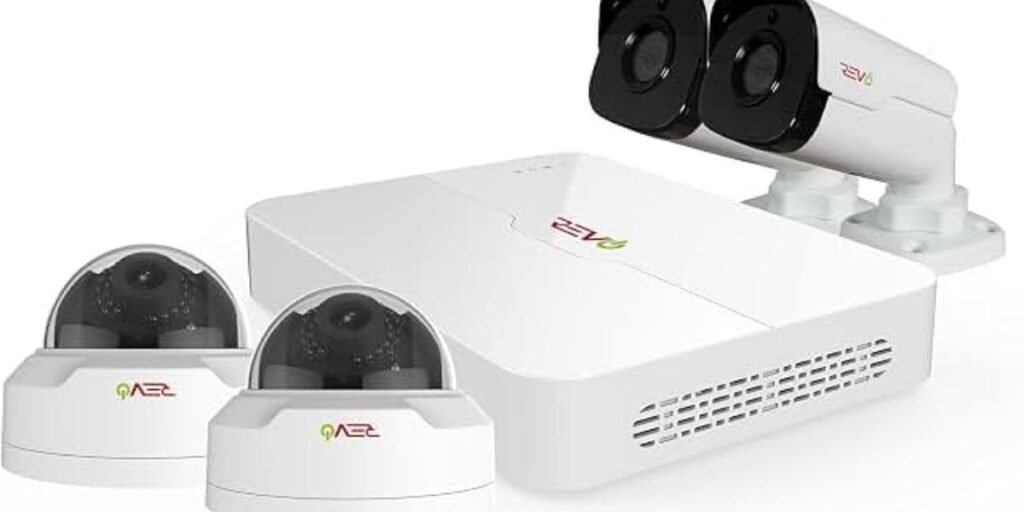
Securing a residential perimeter without turning your home into a construction zone has long challenged property owners. Traditional setups demand running coaxial or CAT6 lines through finished drywall and multi-story insulation, turning a weekend DIY project into a major chore.
The REVO Ultra Wireless NVR Smart Security Camera System (RUW42B4E-1T) solves this bottleneck by replacing vulnerable video cable runs with a dedicated local Wi-Fi video bridge.
However, approaching a wireless surveillance kit requires realistic expectations. While video feeds travel through the air, these cameras are not completely wireless; every bullet unit still requires a physical connection to a nearby electrical outlet for power.
Understanding this hybrid architecture helps you evaluate, mount, and operate the hardware effectively.
What Comes With The RUW42B4E-1T
Looking past generic marketing language reveals a tightly integrated hardware ecosystem engineered to function as a unified security appliance right out of the box. REVO packages the RUW42B4E-1T as a complete monitoring solution rather than a loose assortment of third-party cloud cameras.
At the core sits a 4-channel Wi-Fi Network Video Recorder (NVR) with a pre-installed 1TB surveillance-grade hard disk drive built for 24/7 video recording.
That base station pairs directly with four 2.1MP 1080p wireless bullet cameras enclosed in weather-resistant housings. The box also includes power adapters, mounting hardware, and documentation.
Investing in a matched bundle eliminates codec compatibility issues, ensuring the hardware handshakes natively upon startup.
How The REVO Ultra Wireless System Routes Its Signal
Tracing how video data moves through the RUW42B4E-1T architecture clears up operational confusion early. Unlike consumer Wi-Fi cameras that route high-bandwidth streams through distant cloud servers, this system operates on a private, self-contained local loop.
Each camera broadcasts video over a dedicated frequency straight to the 4-channel NVR, which caches streams onto its internal 1TB hard drive without monthly subscription fees. When checking feeds remotely via smartphone or PC, the NVR bridges that local storage through your home router.
Successful setup involves managing three distinct connections:
- Cameras communicate exclusively with the recorder over a private wireless bridge, keeping heavy traffic off your home network.
- The NVR plugs directly into your internet router via Ethernet for remote access.
- Every individual camera requires a physical connection to an electrical outlet using its bundled power brick.
REVO includes an automated pairing function. Plugging the NVR and cameras into outlets near each other during a bench test lets the hardware handshake automatically, bypassing manual IP configuration.
What The 1080p Cameras Can Actually Capture
Evaluating image clarity requires looking past marketing buzzwords to understand what a 2.1MP image sensor delivers during real-world surveillance tasks. The hardware utilizes a standard 1080p Full HD resolution inside a weather-resistant bullet housing designed for versatile mounting.
Because these units rely on fixed optical lenses, their monitoring effectiveness depends heavily on placement. A 1080p sensor configuration captures clean, usable details across key property zones:
- Front door entryways and porch approaches
- Vehicle movement and driveway activity
- Side yards and perimeter gates
- Garage interiors and outbuilding entry points
While this resolution provides solid identification footage for standard residential lots, it represents a baseline operational standard. Compared to 4K alternatives, a 1080p sensor cannot resolve fine facial features at extended ranges, requiring careful placement near targeted choke points.
Night Vision And Camera Placement Strategies
Effective night surveillance relies heavily on optical geometry and physical positioning. The system utilizes integrated infrared LEDs rated to illuminate targets up to 100 feet away in total darkness, but usable identification distance is significantly shorter.
Deploying exterior cameras requires balancing height, angle, and environmental reflection:
- Position bullet cameras roughly 8 to 10 feet off the ground to prevent tampering while avoiding harsh overhead shadows.
- Avoid pointing IR lenses directly at white brick walls or metallic siding at close range, as reflected light creates a washed-out glare.
- Keep cameras away from aggressive direct light sources like streetlamps that trigger premature mode-switching.
- Test live video feeds on a mobile device before securing mounting brackets with masonry anchors.
Installing The Cameras Without Running Video Cables
The core convenience of the RUW42B4E-1T package lies in bypassing the labor of fishing video cables through finished walls or subfloors. Executing a clean installation follows a structured deployment sequence.
Position the NVR indoors near a central power outlet and your internet router to maintain stable wired connectivity. Map out your four bullet units to cover primary high-traffic zones.
Before drilling permanent holes, plug a camera into a temporary outlet near its intended spot and check the NVR signal indicator. Concrete walls, thick stucco, and dense foliage can severely degrade wireless throughput.
Once signal integrity is verified, secure the housings, power up the units to let the Auto-Pair function establish the local stream, and lock down the swivel brackets.
Getting The NVR Online And Setting Up Remote Viewing
A home security setup loses value if you cannot check live feeds while away, making proper network configuration essential. The system coordinates remote access through a multi-layered software ecosystem where the NVR acts as the local secure hub, the home router bridges internet connectivity, and the cloud relay layer facilitates secure handshakes without complex port forwarding.
Setting up mobile access is straightforward. The NVR generates a unique QR code on its display interface; scanning that code through the REVO Ultra app links your smartphone to the recorder within seconds.
For desktop monitoring, MyRevoCloud provides browser-based access, while EZ-STATION software offers a dedicated PC workstation interface to manage multiple recording units simultaneously.
Managing Recorded Footage On The 1TB NVR
Maximizing the factory-installed 1TB hard disk drive requires understanding how local loop recording handles incoming data streams without monthly subscription fees. Storage longevity depends on your recording configuration:
- Continuous 24/7 Recording: Captures constant video from all four cameras around the clock, offering maximum coverage history before old files loop.
- Motion-Activated Recording: Logs video segments only when the pixel matrix detects movement, dramatically extending storage retention.
- Scheduled Recording: Restricts active recording to specific operational windows, such as overnight hours.
Searching archives is straightforward through an interface that lets operators filter timelines by date, time stamps, or motion triggers. You can export important video segments onto a standard USB flash drive plugged into the NVR chassis, and the internal file system automatically overwrites the oldest segments in a continuous loop once capacity is reached.
Wireless Range Is The Main Installation Constraint
While cutting out video cable runs makes wireless NVR architecture appealing, physical environmental variables dictate overall performance. REVO notes that structural building materials and competing local radio frequencies can significantly reduce operational distance.
Signal propagation suffers heavily when passing through dense obstacles:
- Reinforced concrete and brick walls block high-frequency radio waves.
- Metal siding and aluminum framing create a localized Faraday effect that degrades Wi-Fi transmission.
- Heavy foliage retains moisture, scattering wireless packets.
- Competing 2.4GHz routers introduce channel congestion.
Mitigating these constraints requires pragmatic pre-installation testing. Never permanently mount an exterior camera based solely on an indoor bench test. For detached garages or workshops, verify that the NVR signal indicator registers a stable connection before anchoring hardware.
What The Four-Channel Design Means For Expansion
Understanding the structural boundaries of a 4-channel system prevents frustrating scalability bottlenecks. The NVR hardware core is built around a fixed four-channel architecture designed to process exactly four simultaneous video inputs, making it an all-inclusive solution tailored for a four-camera layout.
Properties requiring wider coverage or secondary outbuilding monitoring cannot add a fifth or sixth camera to this specific unit. Buyers planning future expansions should assess whether their perimeter requires six to eight viewpoints, in which case starting with an expanded multi-channel recorder is more cost-effective.
Where The RUW42B4E-1T Makes Sense
Choosing the right surveillance architecture depends entirely on property layouts and installation hurdles. The REVO wireless system excels in targeted operational scenarios:
- Finished Residential Properties: Ideal for existing homes where drilling through finished drywall or hardwood subfloors to run cables is impractical.
- Detached Garages and Outbuildings: Helpful for monitoring secondary structures within reasonable wireless range where trenching conduits is cost-prohibitive.
- Local-First Data Control: Suited for users who demand local NVR storage and mobile access without monthly cloud fees.
When A Wired REVO System Is The Better Choice
Despite the convenience of wireless transmission, a traditional hardwired configuration remains superior under specific structural conditions:
- Available Ethernet Infrastructure: If a home already contains structured cabling, a wired Power over Ethernet (PoE) system delivers absolute signal stability without Wi-Fi interference risks.
- Extreme Distances and Thick Structures: Properties spanning massive acreage or built with heavy industrial concrete benefit from wired data paths that do not suffer from wireless attenuation.
- High-Resolution Expansion Goals: Users looking for ultra-high-definition sensor arrays and future multi-camera expansion paths will find traditional wired NVR platforms more adaptable.
Where To Buy The REVO Ultra Wireless NVR System
Purchasing security hardware requires verifying model numbers, package inclusions, and authorized retailer warranties. Pricing varies between direct manufacturer outlets and major home improvement retailers.
- REVO America Official Store: The official REVO product page lists core system pricing as a reliable benchmark for standard manufacturer cost.
- The Home Depot: Offers the exact REVO Ultra Wireless RUW42B4E-1T package for $299.99, providing local store pickup options and standard return policies.
When comparing purchasing channels, verify the exact model number (RUW42B4E-1T), hard drive capacity, and warranty terms to avoid confusion with older analog kits.
REVO Ultra Wireless NVR RUW42B4E-1T Specifications
| Specification Category | System Hardware Details |
| Recorder Unit | 4-channel Wi-Fi Network Video Recorder |
| Camera Bundle | Four wireless outdoor bullet cameras |
| Sensor Resolution | 2.1MP / 1080p Full HD |
| Internal Storage | Pre-installed 1TB surveillance-grade HDD |
| Night Illumination | Up to 100 feet via integrated infrared LEDs |
| Operational Environment | Indoor / Outdoor weather-resistant housing |
| Video Transmission | Dedicated local Wi-Fi pairing |
| Mobile Application | REVO Ultra app (iOS / Android) |
| Browser Access | MyRevoCloud portal |
| PC Management | EZ-STATION workstation software |
The REVO Ultra RUW42B4E-1T Is Best Under The Right Conditions
Selecting the REVO Ultra Wireless NVR Smart Security Camera System (RUW42B4E-1T) comes down to matching its engineering strengths against your specific property layout. The system provides a practical balance for homeowners needing a reliable four-camera 1080p surveillance network with local storage while avoiding the labor of running video cables across finished walls.
Its primary advantage lies in straightforward wireless setup and local data retention, but installers must account for its physical realities: cameras require individual power outlets, and wireless signal paths remain sensitive to thick concrete, metal framing, and dense foliage. For properties where cable routing is difficult and a four-camera layout fits the scope, this system delivers a dependable, self-contained monitoring solution.