
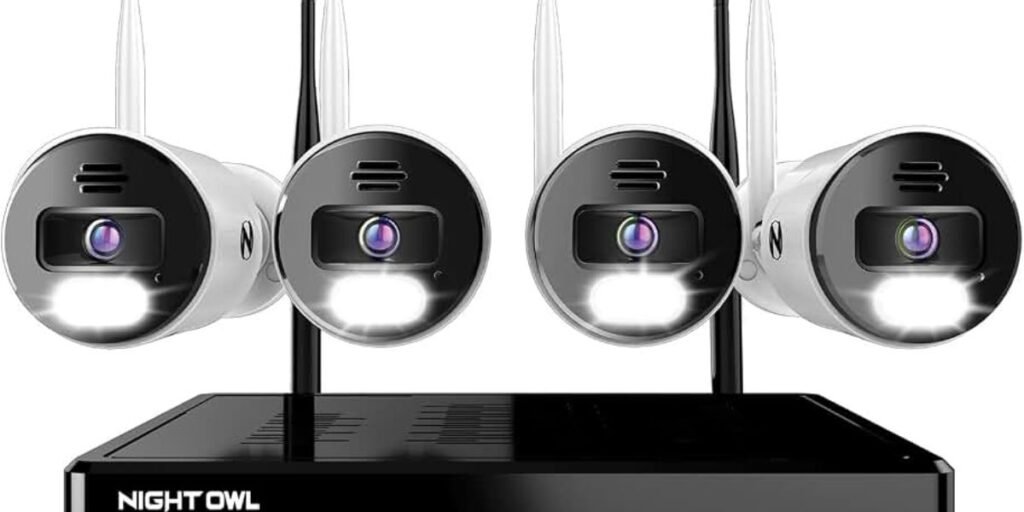
The Night Owl CAM-FWIP2-IN is a small indoor camera that records in 1080p and sends video over Wi-Fi. Night Owl calls it a U.S. designed and engineered indoor plug-in wireless camera, and some retailers list it under the name Deterrence Camera. It runs off a wall outlet rather than a battery, so it keeps recording without any charging routine.
It is meant for rooms inside the house, such as a living room, hallway, front entry, or play area. It costs far less than a full camera system, but it can still join a compatible Night Owl recorder later if you decide to build one out.
Night Owl 1080p Camera Features and Specifications
The specs below come from Micro Center’s product listing and match what other retailers publish.
The camera records at a maximum of 1920 x 1080 using a CMOS sensor. The lens covers 80 degrees diagonally, which is narrow enough to avoid warped edges and wide enough for a hallway, a doorway, or a small room. Infrared LEDs handle night vision at distances up to 30 feet. A built-in microphone and speaker provide two-way audio, and the listing also shows Google Home support.
On the connectivity side, it supports 802.11b, g, and n, which means 2.4 GHz Wi-Fi only. Local storage goes on a microSD card of up to 128 GB. The body measures about 2.3 inches across and 4.2 inches tall; it is white, and it mounts on a wall. The warranty is one year, parts and labor.
Video Resolution and Night Vision
At 1080p, you can make out faces, tell what your dog is up to, and see what someone is wearing, as long as they are in the same room. Zooming into a far corner is a different story. The picture gets soft quickly because there is no extra resolution to work with.
At night, the camera switches to infrared automatically, and the image turns black and white. The 30-foot figure is the maximum under good conditions. Light walls bounce infrared well. Dark paint, big open spaces, and glass do not, and in those rooms you will probably get 15 to 20 feet of useful range. If you are choosing a mounting spot, avoid pointing the lens at a mirror, a TV, or a window, because they throw back the IR light and leave a glare.
Two-Way Audio, Motion Detection, and Alerts
The microphone picks up sound across the room, and the speaker plays back whatever you say through the app. That is handy for talking to kids or pets, or for letting someone at the door know you are watching. Night Owl’s manual also mentions preset audio alerts and a camera siren.
Motion detection works by comparing frames and flagging changes. When the change passes your sensitivity setting, the camera records a clip and sends a push notification to your phone. Ceiling fans, curtains, and moving light from a window are the usual causes of false alerts, so lower the sensitivity or shrink the detection zone if your phone keeps buzzing for nothing.
How the Camera Connects and Gets Power
Plug-in wireless sounds contradictory, but it only describes two separate jobs. Wireless refers to the video, which travels over Wi-Fi instead of an Ethernet cable. Power still needs a cable, as Best Buy’s spec page explains for wireless cameras in general.
For this model, power comes through a USB cable and power adapter that plug into a standard outlet. A mount and hardware are included. Since it never runs on batteries, there is nothing to charge and no battery to weaken in a cold room.
The camera will not join a 5 GHz network. That is a limitation, but 2.4 GHz does have an advantage indoors, since the signal passes through walls and furniture better than 5 GHz does.
How to Set Up the Night Owl 1080p Camera
Setup is quick if the Wi-Fi band is right. Most failed pairings come from the camera trying to join a 5 GHz network.
Begin by confirming that your router broadcasts a 2.4 GHz network. If the router uses a single name for both bands, split them in the router settings until the camera is paired.
Install the Night Owl Protect app on your phone and create an account. Then plug the camera in near your router, and wait for the status light to show it is ready.
In the app, add a new device and choose the Wi-Fi or IP camera option. Scan the QR code on the camera, then type in your 2.4 GHz network password. The app will either show a QR code for the camera to read or send the details straight to it.
After the app confirms the connection, move the camera to its permanent spot. Before you mount it, check the Wi-Fi signal there on your phone. A weak signal at the final location is the most common reason for choppy video later.
Adding the Camera to the Night Owl Protect App
The Night Owl Protect app handles live view, notifications, and settings. Once the camera is paired, the dashboard shows a live thumbnail, the connection status, and a button for two-way audio.
From the settings menu, you can set recording schedules, adjust motion sensitivity, manage notifications, and install firmware updates. The user manual recommends checking for updates regularly, which is good practice for any device on your home network.
Using the Camera With a Compatible Night Owl Recorder
You can also connect the camera to a compatible Night Owl recorder instead of using only the app. Night Owl’s listings confirm you can add it to a compatible recorder or connect through your router.
On a recorder, the footage saves to the recorder’s hard drive next to your other cameras, so you do not need a microSD card in each one. Support depends on the recorder model. Night Owl publishes a compatibility chart, and the manual tells owners to confirm their DVR or NVR works with this camera before buying.
Recording and Storage Options
You can store video two ways, and neither needs a monthly fee. Night Owl says the camera records locally to a microSD card or to a compatible recorder.
For card recording, the slot takes cards up to 128 GB, and a Class 10 card is the right type for continuous recording. When the card fills up, the camera records over the oldest footage.
With a compatible recorder, video goes over your network to the recorder’s drive, which can hold much more than a card and supports 24/7 recording. With either method, you can still watch live video and review clips in the Night Owl Protect app.
Where the Night Owl 1080p Camera Works Best
This camera does best in ordinary rooms where you want a general view. A living room or den is a good fit. An entry foyer or interior doorway works well too, since you will get a clear look at anyone coming in. The 80-degree lens suits narrow hallways and home offices, where there is little wasted space. It is also easy to move if you rearrange the room.
It does not belong outdoors. The housing has no weather sealing, so rain, humidity, and extreme temperatures can damage it. It also should not face a window at night, since the infrared light bounces off the glass and ruins the picture.
What to Know Before Buying the Night Owl 1080p Camera
Review these critical requirements before purchasing to ensure the camera fits your setup:
- Verify 2.4 GHz Wi-Fi Availability: The camera operates exclusively on 2.4 GHz Wi-Fi bands and cannot connect to 5 GHz Wi-Fi networks.
- Locate Nearby Electrical Outlets: Because the camera requires constant AC power, ensure a standard outlet is located near your intended mounting location.
- Plan Your Storage Strategy: MicroSD cards are sold separately, so you must purchase a compatible Class 10 MicroSD card (up to 128 GB) if you plan to record locally without an NVR.
- Check Night Owl System Compatibility: If you intend to connect this camera to an existing Night Owl NVR system, verify that your specific recorder model supports adding FWIP2-series IP cameras.
Night Owl 1080p Plug-in Indoor Wireless Security Camera: Pros and Limitations
Evaluating both the operational advantages and hardware constraints helps set realistic performance expectations.
Key strengths include full HD 1080p resolution, continuous AC power without battery maintenance, and no mandatory monthly subscription fees. The inclusion of two-way audio and integration with the Night Owl NVR ecosystem further enhances its overall utility.
On the other hand, notable limitations include an indoor-only chassis that lacks weatherproofing, reliance on a physical wall outlet for power, and incompatibility with 5 GHz Wi-Fi networks. Additionally, the 80-degree lens angle offers narrower coverage compared to wider 110-degree or broader wide-angle models.
Who the Night Owl 1080p Plug-in Camera Makes Sense For
The Night Owl CAM-FWIP2-IN is best suited for homeowners and renters who want simple, reliable indoor security monitoring without recurring monthly costs. It works exceptionally well for users who already own a compatible Night Owl NVR system and want to add another indoor viewing angle to their network.
This camera is also a great fit for people who prefer a maintenance-free, plug-in setup over battery-operated cameras that require frequent recharging.
However, if you need outdoor weather protection, a battery-powered device for locations without outlets, or higher 2K or 4K resolution to capture fine detail over long distances, you should consider a higher-tier security camera model.
Night Owl 1080p Plug-in Indoor Wireless Security Camera: Final Take
The Night Owl 1080p Plug-in Indoor Wireless Security Camera (CAM-FWIP2-IN) provides dependable indoor monitoring with 1080p resolution, 2-way audio, infrared night vision, and flexible local storage options. By relying on direct AC power and a standard 2.4 GHz Wi-Fi connection, it delivers steady, continuous performance without the hassles of battery maintenance.
Before purchasing, double-check that you have a dedicated 2.4 GHz Wi-Fi network, an available wall outlet near your installation site, and a compatible MicroSD card or Night Owl NVR system ready for video storage.